
Diecast Guides
Diagnosing Car Problems With OBD2: Scanner Options for Your Car
Nov
A warning light is a reason to scan, not a verdict on what needs replacing. Diagnosing car problems with OBD2 is worthwhile when a warning light, error message or code appears: a scanner plugs into the vehicle’s OBD socket to read fault codes and sensor data. There are over 200 car diagnostic fault codes, so a scan can help narrow down the issue, but the code needs interpreting alongside the car’s symptoms.
It’s understandable to wonder whether a scan will give you a clear answer or just another code to decipher. Used well, a diagnostic tool can provide useful information before repair work begins, helping you understand what the vehicle’s computer has detected and giving a mechanic a more informed starting point.
This guide explains how scanners work across different makes and models, what a scan can and can’t tell you, and when a professional diagnosis may be worthwhile. You’ll also learn how stored codes and live sensor data can support repair decisions, helping you approach the next step with a clearer picture of the problem.
Key Takeaways
- Use a scan when a warning light or fault message appears, then interpret the code alongside the car’s symptoms rather than treating it as a diagnosis on its own.
- Check that a scanner suits your vehicle’s age and system before connecting it, as compatibility can vary across makes and models.
- Combine scan results with your own observations to understand what diagnosis and repair work may involve.
- See how live sensor readings and stored codes can give repair work a more informed starting point.
Is a car diagnostic test worth it?
It’s useful when a warning light or error message appears: a scanner can read fault codes and sensor data. A scan narrows down what the vehicle’s computer has detected, but the code still needs to be matched with the car’s symptoms.
Reading and clearing fault codes
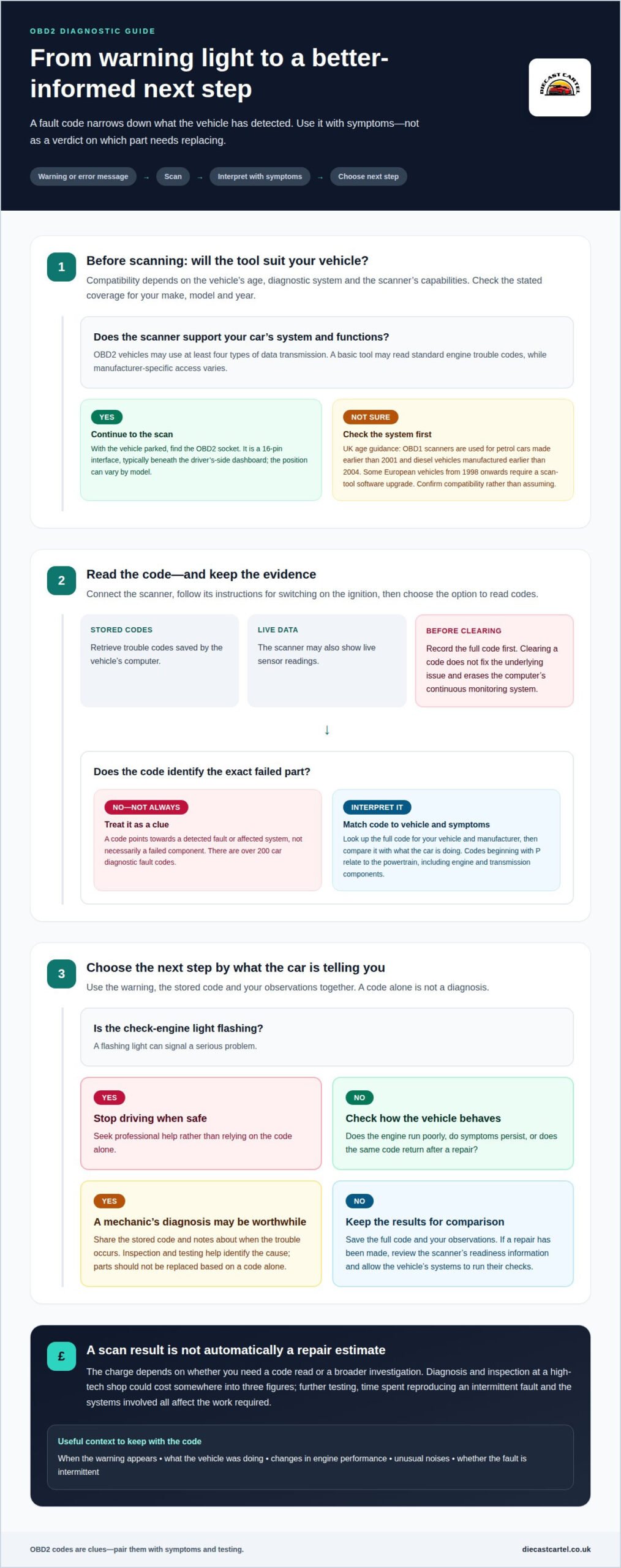
Connect an OBD-II scanner to the vehicle’s diagnostic socket, switch on the ignition as directed by the tool, then select the option to read codes. The scanner retrieves stored trouble codes and may show live sensor readings. Clearing a code should not be treated as a fix for the underlying issue. It also erases the computer’s continuous monitoring system, so record codes before clearing them.
Interpreting codes and researching symptoms
To read OBD2 fault codes step by step, record the full code, look up its definition for your vehicle and manufacturer, then compare it with the symptoms. Codes beginning with P relate to the powertrain, including engine and transmission components. There are over 200 fault codes, so a definition points towards an affected system, not necessarily a failed part. Research symptoms alongside the code, using vehicle-specific information rather than treating a general search result as a diagnosis.
Checking inspection readiness
After a repair, a fault code may remain in computer memory for a number of ignition cycles. A blank code screen alone doesn’t confirm that the vehicle’s checks have resumed. Review the scanner’s readiness information after the repair and allow the vehicle’s systems to run their checks. Keep the original code and repair details for comparison.
Deciding when to contact a mechanic
A flashing check-engine light can signal a serious problem. Stop driving when it’s safe and seek professional help. A steady warning also needs attention if the engine runs poorly, symptoms persist or the same code returns after a repair. Take the stored code and notes about when the trouble occurs. A mechanic can use these clues alongside inspection and testing to identify the cause, rather than replacing parts based on a code alone.
Using OBD2 scanners across vehicle makes and models
Compatibility depends on the vehicle’s age, diagnostic system and the scanner’s capability. In the UK, the key distinction is whether your car uses OBD2 or an older system.
Connecting to the diagnostic port
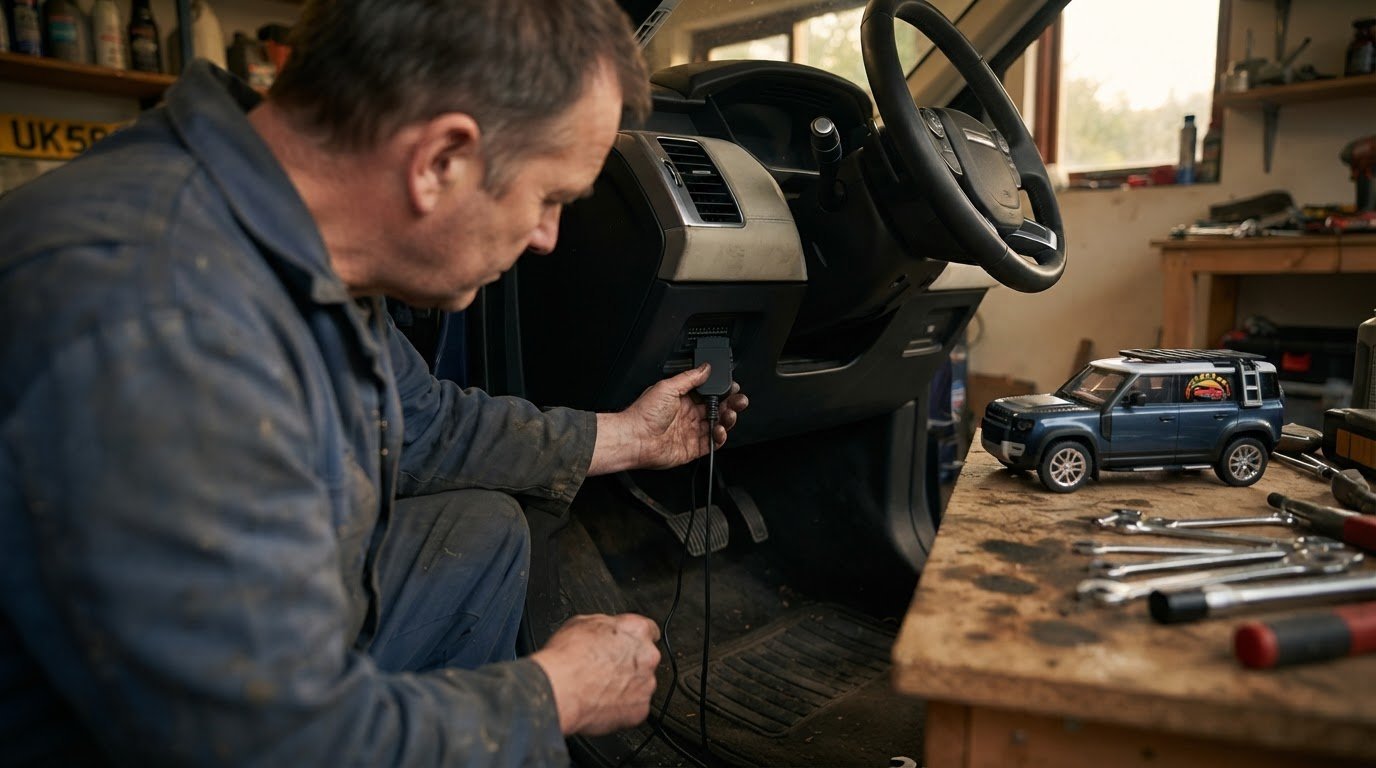
An OBD2 port is a 16-pin interface giving access to the vehicle’s internal computer. It’s typically beneath the driver’s-side dashboard, though its exact position can vary by model. With the vehicle parked, locate the socket and push the scanner connector firmly into place. Follow the scanner’s instructions for switching on the ignition and retrieving codes. A garage uses the same connection point to access stored vehicle information.
Pairing a smartphone with a scanner
For a phone-based setup, connect a compatible scanner to the OBD2 port, then follow its pairing instructions. Depending on the scanner, the phone may connect through Bluetooth or Wi-Fi, and an app displays the information it can retrieve. Check that the app supports your phone and the scanner before starting. Once connected, use the app’s menu to read codes or view available sensor data, then save useful results.
Scanner compatibility isn’t identical across all makes and models. OBD2 vehicles may use at least four different types of data transmission, so a tool’s supported systems affect what it can read. A basic car diagnostic tool may retrieve standard engine trouble codes, while access to manufacturer-specific systems can vary. Check the scanner’s stated vehicle coverage and functions against your car’s make, model and year.
UK vehicle age helps identify which system to look for: OBD1 scanners are used for petrol cars made earlier than 2001 and diesel vehicles manufactured earlier than 2004. Some European vehicles from 1998 onwards require a scan-tool software upgrade. These dates guide the choice, but don’t assume a scanner will work across every vehicle from a given year. Confirm the connection type and the scanner’s capabilities before relying on it to investigate a dashboard warning.
How much does a diagnostic scan cost for a car?
A diagnostic scan’s charge depends on whether you need a code read or a broader investigation. Diagnosis and inspection at a high-tech shop could cost somewhere into three figures. Further testing, time spent reproducing an intermittent fault and the systems involved all affect the work required. A scan result is a starting point, not automatically a repair estimate.
An OBD II scan tool connects to the vehicle’s computer and retrieves stored trouble codes. Before booking work, note the warning light, when it appears and what the vehicle was doing. For example, a fault that appears during acceleration gives useful context alongside the code. That information helps distinguish a basic code check from diagnostic work involving additional inspection.
Can OBD2 codes identify the exact cause of a car problem? No. A code identifies a detected fault or affected system, but it doesn’t always identify the failed component. A powertrain code, for instance, can relate to the engine or transmission, so symptoms and testing help pinpoint the cause.
To make the scan more useful, share your observations and the complete code with the technician. Include changes in engine performance, unusual noises, and whether the warning appears after starting or during a journey. The scanner’s results can then be considered alongside those details. If a fault is intermittent, describe when it occurs; that can guide further investigation instead of relying on a single stored code.
Emissions-related warnings also need context. Under OBD II, the Check Engine light comes on when a failure significantly affects emissions. A code can therefore flag an emissions problem without specifying the repair. The next step may involve examining sensor readings or other vehicle information, depending on the fault. Ask what the scan has established, what further checks are recommended and whether the charge covers only the scan or additional diagnosis.
Record the code and findings before clearing them or carrying out repairs. This gives you a useful comparison if the warning returns and helps connect later symptoms with earlier scan results.
Benefits of diagnostic tools for repair work
An OBD II scan gives a mechanic information to guide repair work, rather than relying on a warning light alone. A full on-board diagnostic test can report on engine management, transmission, ignition coils, throttle performance and exhaust quality. It can also provide information about brakes, coolant levels, fuel injection and ignition timing. These readings help focus inspection on systems linked to the reported fault.
That focus matters when symptoms appear intermittently. OBD II capture mode can record sensor readings at the instant a driveability problem occurs. If the engine hesitates during acceleration, for example, recorded data can help a mechanic examine what the vehicle’s sensors reported at that moment. A record of when the issue happened, alongside those readings, gives repair work useful context.
Diagnostic tools also support a structured repair process. First, the mechanic reviews stored faults and relevant live data. Then they compare the results with the driver’s description and inspect related components. For an ignition concern, scan information about ignition timing can help direct further checks. The tool narrows the investigation; physical inspection and testing establish what needs attention.
For drivers, diagnosing car problems with OBD2 means treating scan findings as evidence to discuss, not a repair instruction. Ask which system the scan identified, what supports the proposed repair, and whether related components have been inspected. A fault code alone doesn’t prove that a particular part has failed. Matching it with symptoms, sensor readings and inspection findings helps avoid mistaking the first clue for the complete diagnosis.
Use the scan as a shared reference point. Keep the code, warning-light behaviour and any recorded data with your repair notes. If the same problem returns, those details give the mechanic a comparison with earlier findings. This is the practical value of diagnosing car problems with OBD2: the tool helps organise evidence, target testing and explain why a repair is recommended.
Diecast Cartel: 1:24 scale Diecast models and trucks
Diecast Cartel offers 1:24 scale diecast models and trucks for enthusiasts who enjoy collecting detailed vehicles alongside caring for their own car. After using scan results to plan your next repair step, you might also enjoy exploring a different side of motoring: choosing a model that reflects a favourite vehicle or sparks a new collecting interest.
The range includes Diecast Trucks and Tractors, as well as 1:18 Scale Model Cars. For hands-on play, there’s also a 1:24 Remote control Forklift. Whether you’re adding to a collection or picking out a first model, these options offer different ways to appreciate vehicle design and machinery.
Explore the range online, or contact Diecast Cartel if you’d like to find out more.
Take your next step with confidence
A useful next step is to keep a simple record of what your car does: note when a warning appears, how the vehicle behaves and what the scan reports. That gives you a clearer starting point for discussing repair work, and helps you make decisions based on evidence rather than guesswork. Diagnosing car problems with OBD2 is most useful as part of that considered approach, with scan results read alongside real symptoms.
Car interest doesn’t end with maintenance. For many enthusiasts, the enjoyment continues through collecting models that capture favourite vehicles and machinery. Diecast Cartel offers collectors a range of diecast models, from trucks and tractors to cars, bringing automotive design into a display.
If you’re ready to explore that side of the hobby, visit Diecast Cartel. Keep learning about your car, build your collection at your own pace, and enjoy every step of the journey.
Frequently Asked Questions
How to use a diagnostic tool on a car?
Park safely, connect a compatible diagnostic tool and follow its instructions to start a scan. Save the results before making changes, then compare them with what you noticed, such as hesitation during acceleration or a warning that appeared after starting. Treat the scan as information to guide your next checks, not as an instruction to replace a particular part.
What is a diagnostics fault code check?
A fault code check reads diagnostic trouble codes stored by a vehicle’s computer, helping identify which system has reported an issue. It can be useful after a warning appears, even if the car seems to drive normally. Keep a note of the code and any symptoms, then use both to explain the concern during further diagnosis. A code check alone isn’t a physical inspection.
What are the different types of car diagnostic tools?
Common options include handheld code readers, more capable workshop scan tools and smartphone-connected scanners. A basic reader is suited to retrieving information from supported systems, whilst advanced tools can offer broader diagnostic functions. Phone-connected versions display results through an app. Choose according to whether you need a simple code check or more detailed information for a particular vehicle. For motorists and technicians sourcing reliable equipment, automotive tool distributors like naredi.in supply a range of international diagnostic solutions.
How do car diagnostic scanners work?
A scanner communicates with a vehicle’s onboard computer and presents the information it can access in a readable format. The computer receives signals from vehicle systems and sensors; when it detects a fault, it can store a corresponding code. A scanner helps translate that information for the driver or mechanic. Its coverage depends on the scanner and the systems supported by the vehicle.
What are dashboard warning lights?
Dashboard warning lights alert the driver that a vehicle system needs attention. A light may appear because the car’s computer has detected an issue, or because a system has been switched on. Check the vehicle handbook for the meaning of the specific symbol, then note when it appears and how the car behaves. That context can help guide diagnosis.
What does OBD stand for?
OBD stands for On-Board Diagnostics, the vehicle’s system for monitoring and reporting certain faults. OBD2 is a later diagnostic standard used by many modern cars, while older vehicles may use different systems. The distinction matters when choosing a scanner: confirm that its supported system matches your vehicle, rather than assuming every diagnostic tool works with every model.
