
Diecast Guides
Bluetooth OBD2 scanners compared by price, value and app options

Oct
Your dashboard warning light is a clue, not a diagnosis. A Bluetooth OBD2 scanner in the UK plugs into the car’s 16-pin OBD socket and sends fault-code information to a phone app, helping you understand what may be behind the warning. Petrol passenger cars sold in Europe have had OBD ports since 1 January 2001, with diesel cars following in 2004.
It’s easy to assume every scanner does the same job, or that the cheapest dongle will tell you everything. In practice, the app matters too: a Bluetooth dongle paired with a paid app can provide live data, readiness checks and fault clearing for a home mechanic.
This guide explains what an OBD reader does and how the scanner and app work together, then compares around nine options by price, value and app compatibility. You’ll also find a practical way to match the right tool to your car and the jobs you want to tackle.
Key Takeaways
- Learn how OBD2 compatibility differs by fuel type and vehicle age, and what the 16-pin socket is for.
- Compare scanner prices and features to see what may offer better value for your diagnostic needs.
- Match a tool to the task, from reading fault codes to viewing live data and clearing faults.
- See how a Bluetooth dongle and smartphone app work together, and why app choice matters.
- Use the decision guide to narrow down the scanner type that suits your car and how you plan to use it.
What is an OBD2 scanner?
An OBD2 scanner reads diagnostic information from a vehicle’s engine computer, including fault codes. Bluetooth adapters can often share diagnostic information with an app, and the socket is usually positioned where the driver can reach it.
OBD2 and EOBD Port Compatibility
OBD2 is the common name for the diagnostic connection; EOBD is its European equivalent. Petrol passenger cars sold in Europe have had OBD ports since 1 January 2001, while diesel cars followed in 2004. The socket is a 16-pin connector, usually under the dashboard, and UK and EU regulations require it to be within reach of the driver’s seat.
These dates help narrow down compatibility, but they don’t guarantee that every scanner supports every function on a particular vehicle. Check that the adapter and app support your vehicle’s fuel type and the diagnostic tasks you need before relying on features beyond reading engine fault codes.
Vehicle Make and Protocol Compatibility
A scanner communicates using vehicle protocols, and the supported systems can vary by make, model and year. A basic adapter may read engine fault codes, whilst a more capable tool may cover other systems or functions. For example, DoIP support is advised for 2020-on BMW, Land Rover, Volvo and VW EVs; older ELM327 dongles cannot communicate with them.
Vehicle coverage is therefore more useful to compare than a long feature list on its own. Match the tool to your make and model, then decide whether you need engine codes only or broader diagnostics.
Setup is straightforward: locate the socket, plug in the adapter, switch on the ignition, then pair it with a compatible app. Android, iOS and Windows support varies by adapter and app. A listing for an OBD2 Bluetooth scanner specifies iOS, Android and Windows, whilst an ELM327 listing covers Android and Windows, so check the operating system before choosing.
App choice shapes what appears on screen. One app may focus on fault codes, while another offers live engine data or readiness checks. A Bluetooth dongle paired with a paid app can handle live data, readiness checks and fault clearing for a UK home mechanic.
Price is another comparison point, but the lowest-cost adapter may not suit a vehicle needing wider system access. The typical market range for Bluetooth OBD2 scanners or diagnostic adapters is £30 to £74. Compare that spend with the features you’ll actually use, the app’s operating-system support and vehicle coverage.
| Option | Connection | App compatibility | Best comparison point |
|---|---|---|---|
| Bluetooth adapter | Direct wireless link | Depends on adapter and app | Simple phone-based diagnostics |
| Bluetooth Low Energy adapter | Lower-power wireless link | Check supported devices and apps | Phone and app compatibility |
| Wi-Fi adapter | Local wireless network | Check the app’s connection method | Wireless setup requirements |
| ELM327 dongle | Bluetooth on listed examples | Android and Windows on one listing | Vehicle protocol and system coverage |
Start by checking your vehicle’s year and fuel type, then match protocol support, phone operating system and app features to the diagnostics you need.
Scanner prices and value for money
UK scanner prices range from simple code readers to professional diagnostic systems. Value depends on the faults and vehicle systems you need to access, not just the screen or purchase price.
UK Scanner Prices
The typical market range for a Bluetooth OBD2 scanner or diagnostic adapter is £30 to £74, with a median of about £45. Those figures describe very different capabilities, so compare the diagnostics included rather than treating every scanner as equivalent.
For a petrol car and occasional engine checks, a basic code reader may suit a driver who only wants fault codes. A Bluetooth adapter may cost more, but pairs with a phone app instead of relying on a built-in display. Consider whether you’ll use the app’s extra functions before paying more.
Diagnostic Tool Prices
Car diagnostic tools include more than plug-in code readers. Higher-tier tools are designed for broader diagnostics, not just reading an engine warning code.
That comparison can help you assess value, but a home scanner and a dealer diagnostic aren’t identical: both the tool’s coverage and the diagnostic work performed matter. A sensor-related fault, for example, may need further investigation beyond reading a code.
Scanner Budgets
Set your budget according to the job you want to do. For occasional fault-code checks, prioritise compatibility and clear code descriptions; for repeated diagnostics, consider live data or broader system access. The cheapest reader is poor value if it cannot communicate with the vehicle systems you need.
Also account for software. Mid-range Launch and Autel scanners typically include 1-2 years of software updates. That period can affect long-term value, particularly if you need ongoing vehicle coverage. Compare included update periods and any continuing costs alongside the tool’s features.
Use this quick comparison before choosing:
- Engine codes: compare basic code readers and Bluetooth adapters.
- More vehicle systems: consider handheld scanners covering ABS, airbag or service resets.
- Frequent professional diagnostics: assess whether a higher-tier system’s coverage justifies its price.
Choose the least costly option that covers your vehicle, the systems you need and the diagnostics you’ll actually use.
How do car diagnostic scanners work?
A scanner reads data from a vehicle’s control units through the diagnostic socket. Once connected, it translates electronic signals into fault codes or live data, giving you a starting point for investigating a warning light or running issue.
For a basic scan, follow these steps:
- Park safely, switch off the ignition and plug the scanner into the OBD socket.
- Turn the ignition on after connecting the tool. The engine usually stays off for this scan.
- Open the scanner or app, select the vehicle if prompted, then start diagnostics.
- Record the fault codes and any displayed descriptions before clearing anything.
A code identifies a system or condition the vehicle has detected. It doesn’t automatically prove which component has failed. For example, an engine sensor-related code points to an area to investigate, not necessarily a sensor that needs replacing. Where supported, read the code alongside symptoms and live data, such as changing engine readings.
Testing means checking whether the result fits the vehicle’s behaviour. Note the warning light, scan for codes, then compare available live data with how the engine is running. A code reader that only reports faults offers a narrower view than a tool with live-data functions. Keeping the original code record also gives a garage useful information if the fault needs professional diagnosis.
Choose a scanner based on the system and task involved. For engine warnings, a basic OBD reader can identify engine fault codes. If you need to investigate a specific system, broader coverage matters more than a long feature list.
OBDeleven is another named option to compare, but the name alone doesn’t establish whether a tool suits your car. Prioritise the vehicle make, model and year, then match supported functions to your diagnostic task. For 2020-on BMW, Land Rover, Volvo and VW EVs, DoIP support is advised; older ELM327 dongles cannot communicate with them.
For a useful home test, scan before clearing codes and keep a record of the results. If a genuine fault is cleared without repair, the ECU usually detects it again within 50-100 miles. That repeat reading can help distinguish a temporary reset from a fault that remains active, while giving a garage a clearer diagnostic starting point.
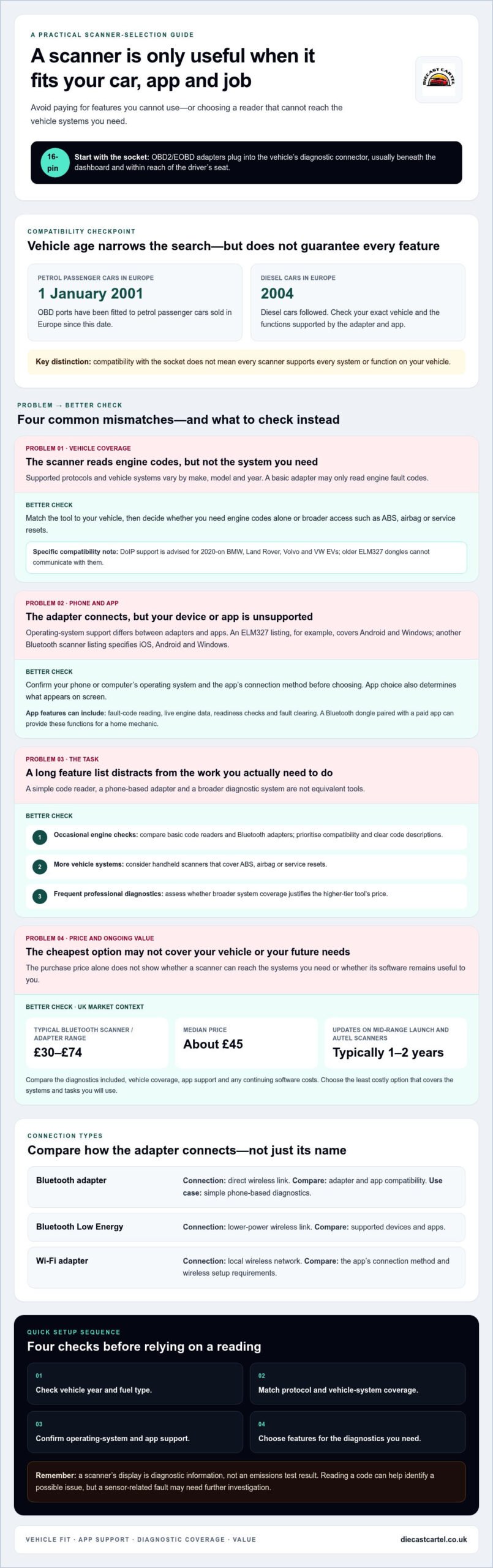
How OBD scanners help diagnose vehicle faults
An OBD scanner provides evidence to investigate a vehicle fault, rather than identifying a guaranteed repair. A fault code points to a detected condition or system. Pair it with symptoms and live data to build a clearer picture before deciding what to do next.
A fault code reader is useful for an initial scan, especially when an engine warning light appears. Record the code and its description, then note when the warning appeared and how the vehicle behaved. A rough idle, for example, provides different context from a warning that appears during steady driving.
Live data shows readings while the engine runs. Depending on the scanner and app, you can use it to observe how values change as the vehicle operates. Compare readings with the timing of symptoms rather than treating one displayed value as proof of a failed component. The compatible app and scanner determine which data is available.
A Bluetooth dongle paired with a paid app can help a UK home mechanic by providing live data, readiness checks and fault clearing. Readiness checks show whether relevant monitoring systems have completed their checks. They can help you understand scan results, but don’t identify or repair the underlying cause of a fault.
Telematics and diagnostics are related, but not interchangeable. A diagnostic scanner reads vehicle information locally through its OBD connection. Telematics generally involves collecting or transmitting vehicle information through a connected system. For a home scan, focus on the scanner’s supported data and functions rather than assuming a fault code reader includes telematics features.
Vehicle coverage matters too. A scanner may read standard engine codes but offer different access to manufacturer-specific systems across makes and models. Check compatibility with the exact vehicle and system you want to investigate. This distinction matters for ABS, airbag and other non-engine faults, which require a scanner that supports those systems.
For newer vehicles, protocol support can be decisive. DoIP support is advised for 2020-on BMW, Land Rover, Volvo and VW EVs; older ELM327 dongles cannot communicate with them. Match the scanner to the vehicle’s make and model before relying on brand-specific diagnostics.
Use a repeatable process to make each scan more useful:
- Save the original fault code and note the symptoms.
- Review supported live data alongside the vehicle’s behaviour.
- Clear a code only after recording it, then scan again if the warning returns.
Bluetooth OBD scanners and smartphone apps
A Bluetooth dongle is only half of the diagnostic setup. Your phone, adapter and app must work together, and each affects the information you can view. Before buying, compare operating-system support, vehicle compatibility and the app functions you plan to use.
Which Bluetooth OBD2 scanners work with iPhone and Android? Compatibility depends on the adapter: one UK listing supports iOS, Android and Windows, whilst an ELM327 listing supports Android and Windows. Match the scanner’s stated systems to your phone before choosing.
Which OBD2 scanner apps are available in the UK, and do they require subscriptions? Choose an app supported by both your adapter and phone, then compare its included functions and payment model. A paid app paired with a Bluetooth dongle can provide live data, readiness checks and fault clearing.
An app connection can make a compact diagnostic tool easier to use. Instead of reading a small device display, you can view supported fault codes and vehicle data on your phone. App screens and menus differ, so prioritise clear code descriptions and features you’ll genuinely use.
For example, a driver investigating an engine warning may want code descriptions and live readings. A mechanic working with several vehicles may value broader vehicle coverage and additional diagnostic functions. Diesel compatibility matters too: check that the adapter and app support your vehicle rather than assuming every Bluetooth device reads every system.
Use this setup sequence to get started:
- Confirm the adapter supports your phone’s operating system and vehicle.
- Install its compatible app, then enable Bluetooth on your phone.
- Plug the dongle into the vehicle’s OBD socket and switch on the ignition.
- Pair the device in the app and follow its prompts to scan.
- Save fault codes before clearing them, so you retain the original result.
App choice can affect value as much as the adapter. A cheaper dongle may cover a basic scan, while a paid app can add functions such as live data. Compare what each app provides and how it charges, including whether ongoing access is needed for the features you want.
Unplug the dongle after use. Leaving an adapter connected for long periods may affect the vehicle battery, so unplug it after use. Removing it after a scan is a simple habit, especially if the vehicle will remain parked for an extended period.
Before choosing, note your phone type, vehicle make and model, fuel type, and main diagnostic task. This short list helps you assess whether the complete phone-and-adapter setup suits your needs, instead of judging the dongle alone. If you are also interested in broader smart tech and electronics to support your mobile and automotive setups, Dave Hub provides a variety of innovative tech solutions.
A UK-listed Bluetooth scanner supports both iOS and Android. The ELM327 listing supports Android but not iOS, so it won’t suit an iPhone.
Choose an app supported by both your adapter and phone. Paid apps can offer live data, readiness checks and fault clearing. Payment models vary, so check whether ongoing access is needed for the features you want.
Diecast Cartel: 1:24 scale Diecast models and trucks
Diecast Cartel is a natural next stop if your interest in vehicle diagnostics also extends to collecting vehicle models. Explore 1:24 scale diecast models and trucks, Diecast Trucks and Tractors, or 1:18 Scale Model Cars. These categories offer different scales and vehicle types, giving collectors a chance to focus on the subjects they enjoy most.
Prefer a hands-on model? The 1:24 remote control forklift offers a different way to enjoy vehicle-themed collecting. Whether you’re adding to an established collection or choosing a first model, browse the available categories to find a style that suits your interests. Visit Diecast Cartel online to explore the models.
Keep your interest in vehicles moving
Choosing a Bluetooth OBD2 scanner in the UK is one way to get more involved with the vehicles you drive. You can also follow that interest beyond the dashboard, through the design, detail and character of model vehicles. Whether you’re drawn to a working truck, a tractor or a classic car shape, collecting gives you another way to enjoy the subject.
Diecast Cartel brings together 1:24 scale diecast models and trucks, Diecast Trucks and Tractors, and 1:18 Scale Model Cars. Each offers a different scale and subject to explore, whether you’re building a collection around a favourite vehicle type or choosing a model that catches your eye. The pleasure is in finding the piece that feels right for your own collection.
Ready to explore the range? Contact Diecast Cartel today and take the next step in your vehicle enthusiasm.
Frequently Asked Questions
What is an OBD reader?
An OBD reader is a diagnostic device that retrieves information stored by a vehicle’s onboard systems. It can display fault codes, which identify a detected issue or system to investigate. Some readers show codes only; others display live readings or access additional systems. For example, an engine-code reader won’t necessarily provide ABS or airbag diagnostics, so match its functions to the warning or system you want to examine.
Where is the OBD port located?
The OBD socket is usually under the dashboard, within reach of the driver’s seat in UK and EU vehicles covered by the relevant requirements. Look beneath the steering wheel and around the lower dashboard first. Some cars place it behind a small trim panel. It’s a 16-pin connector, so compare the socket’s shape with your adapter before plugging it in. Check the vehicle handbook if its position isn’t obvious.
Can I damage my car with an OBD-II scanner?
Reading diagnostic information is the scanner’s intended function, but take care with commands that change vehicle settings. A scan tool may offer code clearing or resets, which can remove useful diagnostic records or affect a system’s stored state. Record codes before using these functions, and don’t select a command unless you understand its purpose. A reader used only to view codes provides information without attempting a repair.
Do I need a scanner that supports DoIP for a 2022 car?
Not for every 2022 vehicle. DoIP support is advised for 2020-on BMW, Land Rover, Volvo and VW EVs, because older ELM327 dongles cannot communicate with them. A 2022 car from another make may use different communication requirements. Check the scanner’s vehicle coverage against your exact make, model and system, particularly if you need manufacturer-specific diagnostics rather than basic engine-code reading.
Do I need to pay for software updates?
It depends on the scanner’s update arrangement and the functions you need. Mid-range Launch and Autel scanners typically include 1-2 years of software updates. After that period, the value of further updates depends on whether you need newer vehicle coverage or continued access to particular features. Before choosing a tool, compare its included update period and any ongoing update terms with how often you expect to use it.
How much should I spend on an OBD-II scanner?
Base your budget on the systems and tasks you need, rather than choosing by price alone. A reader for occasional engine-code checks has different requirements from a tool for ABS, airbag or service-reset work. Consider vehicle compatibility, app costs, software updates and whether you need live data. For a single warning light, identify the function required first, then compare tools that provide it.
How do I use a diagnostic tool on a car?
Park the vehicle, connect the tool to the OBD socket, then switch on the ignition after connecting it. Open the compatible app or scanner menu and begin the scan. Save the displayed codes before clearing anything, and note the warning light or driving symptom that prompted the check. If a code returns after clearing, that repeat result is useful information to share with a garage.
What features should I look for?
Start with compatibility: check your vehicle’s make, model, fuel type and the phone operating system if you’re choosing a Bluetooth OBD2 scanner in the UK. Then decide whether you need engine fault codes only, or live data, readiness checks, code clearing or access to ABS and airbag systems. Owners of certain newer EVs should also consider DoIP support. Prioritise the features tied to your actual diagnostic needs.
