
Diecast Guides
OBD Diagnostic Tool UK: How to Choose and Use a Car Scanner

Sep
What if the right OBD diagnostic tool could make a warning light less of a mystery, without pretending to fix the car for you? Choosing an OBD diagnostic tool UK drivers can use starts with one key question: will it work with your vehicle? Even a compatible scanner may show a code without explaining the cause in plain English. That uncertainty is familiar when you’re deciding whether to investigate further or seek professional help.
This guide explains how to check compatibility before choosing a scanner, what basic fault codes and warning lights can tell you, and when a problem needs a qualified professional. It also compares levels of access: basic EOBD/OBD2 scanners typically focus on engine and emissions data, whilst more advanced tools may access additional vehicle systems.
You’ll learn what to check before connecting a scanner, how to treat its results as a useful starting point, and why clearing a code doesn’t resolve the underlying fault. The aim is to help you turn a warning light into an informed next step, not a guess.
Key Takeaways
- An OBD diagnostic tool reads information available from your car’s diagnostic system. It identifies clues, not repairs.
- Understanding DTC and MIL helps you make better sense of fault codes and warning lights.
- When choosing an OBD diagnostic tool UK drivers can use, compare the connection type and supported systems, then check compatibility with your specific vehicle.
- Before connecting a scanner, check your vehicle’s instructions and record any codes alongside the symptoms you’ve noticed.
- Compare the functions you need with the current product listing, and seek professional help when a warning or fault needs further attention.
What is an OBD diagnostic tool, and what can it tell you?
An OBD diagnostic tool reads information made available by a vehicle’s onboard diagnostic system. It can help identify a reported fault, but it isn’t a repair device. It won’t fix the cause or prove, by itself, which component needs attention.
An OBD diagnostic tool connects to a car’s diagnostic port and translates available vehicle data into codes or readings that can guide your next step. Depending on the car and tool, this may include fault codes and other diagnostic data. The port’s location varies, so check your vehicle handbook before connecting anything. For a broader introduction to the systems behind these tools, see On-board diagnostics (OBD).
What do OBD-II and EOBD mean?
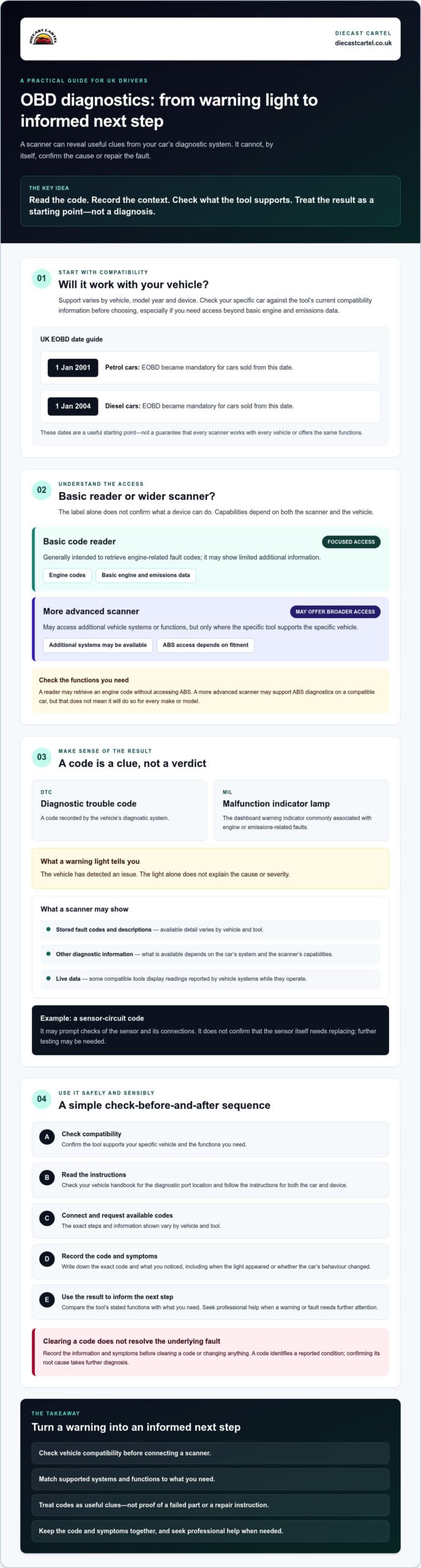
OBD-II is a widely used onboard diagnostic standard; EOBD is its European counterpart. In the UK, EOBD has been mandatory for petrol cars sold from 1 January 2001 and diesel cars sold from 1 January 2004. These dates are a useful starting point, not a guarantee that every tool will work with every vehicle or provide the same functions.
Support can differ by vehicle, model year and device. Check your car’s details against the tool’s current compatibility information before choosing, especially if you need more than basic engine and emissions data.
What is the difference between a code reader and a scanner?
A basic code reader is generally intended to retrieve engine-related fault codes and may show limited additional information. A scanner can offer a wider range of functions, but the label alone doesn’t confirm which systems it can access. Capabilities depend on both the device and the vehicle.
For example, a reader might retrieve an engine fault code from one car but not access its ABS system. A more advanced scanner may support ABS diagnostics on a compatible vehicle, yet that doesn’t mean it will do so for every make or model. Check the stated functions and supported vehicle fitment rather than assuming all tools offer the same coverage.
If you’re comparing an OBD diagnostic tool UK drivers can use, start with what you want to check. Then confirm that the specific device supports your vehicle and those functions. A code is a useful clue, not a diagnosis of the underlying cause.
How does an OBD diagnostic tool read fault codes?
Once you’ve confirmed that the tool is compatible with your car, it can retrieve diagnostic information stored by the vehicle. The basic process is to connect the scanner to the diagnostic port, follow the device instructions to request available codes, then review the results. The exact steps and information shown vary by vehicle and tool, so check both manuals before you begin.
Reading a fault code identifies a reported condition; confirming its root cause takes further diagnosis. A code can point towards a system or issue, but it doesn’t prove that a particular part has failed. Treat it as a clue to investigate, not a repair instruction.
What do DTCs and the engine warning light mean?
A DTC, or diagnostic trouble code, is a code recorded by the vehicle’s diagnostic system. The MIL, or malfunction indicator lamp, is the dashboard warning indicator commonly associated with engine or emissions-related faults. A lit warning tells you that the vehicle has detected an issue, but the light alone doesn’t explain its cause or severity.
Before clearing a code or changing anything, write down the exact code and note what you’ve noticed, such as when the light appeared or whether the car’s behaviour changed. That context can help you or a technician investigate. The California Air Resources Board’s OBD-II Systems Fact Sheet explains how OBD-II monitors emissions-related performance. It’s useful background, although it describes the US system rather than UK vehicle requirements.
What information might a scanner show?
Depending on the vehicle and tool, results may include stored fault codes and descriptions, alongside other available diagnostic information. Some compatible tools can also display live data, meaning readings reported by vehicle systems while they operate. Which readings are available, and how clearly they’re explained, depends on the car’s diagnostic system and the scanner’s capabilities.
A displayed description can make a code easier to understand, but it shouldn’t be taken as proof that the named component is faulty. For example, a code related to a sensor circuit may prompt checks of the sensor and its connections, rather than confirm that the sensor itself needs replacing. Further testing may be needed.
If you’re considering an OBD diagnostic tool UK motorists can use, check the specific listing for supported functions and vehicle compatibility rather than relying on general category labels. You can browse OBD diagnostic tools from Diecast Cartel, then compare each tool’s details with your vehicle before choosing.
Which OBD diagnostic tool is right for your car and needs?
Start with the job you want the tool to do, then match its stated functions to your car. If you only want to retrieve engine fault codes occasionally, a basic code reader may be enough, provided it supports your vehicle. If you need more information, look for a scanner that explicitly lists the systems and functions you require. A higher-specification category doesn’t automatically mean broader coverage for your particular car.
Which tool type suits occasional checks or regular use?
Consider how often you’ll use the device, whether you prefer a built-in screen or a phone interface, and how much diagnostic detail you need. Bluetooth-connected tools may depend on an app and a compatible phone, whilst handheld options have their own display and controls. Advanced functions are only useful if both the vehicle and scanner support them.
| Tool type | Connection type | Intended use | Supported systems | Compatibility checks |
|---|---|---|---|---|
| Basic code reader | Connects to the vehicle’s diagnostic port | Simple code retrieval, if confirmed by the listing | Check which systems are specifically stated | Match the car’s details to the listed vehicle fitment |
| Handheld scanner | Connects to the port; typically operated through its own controls and display | Reading codes and any additional functions stated for the device | Confirm each system and function; don’t assume access to all systems | Check make, model, year, engine and supported functions |
| Bluetooth-connected tool | Connects to the port and communicates with a phone or other compatible device | Using an app to view available diagnostic information | Depends on the vehicle, tool and app | Check vehicle fitment, phone and operating system requirements, and app details |
How can you check compatibility before buying?
Use this checklist before choosing an OBD diagnostic tool UK drivers can connect to their vehicle:
- Compare the vehicle’s make, model, year and engine details with the tool’s current compatibility information.
- Confirm that it supports the specific system you want to check, not just a general category of diagnostics.
- For Bluetooth tools, check whether a phone, operating system, app or separate connection is required.
- Read the listing for stated limitations, and contact the seller if a key detail remains unclear.
A reader that suits one car may not offer the same functions on another, even if both have a diagnostic port. Check the exact fitment and feature details before buying, rather than relying on the tool type alone. For those who also maintain agricultural machinery alongside passenger vehicles, you can discover Mechnician to explore dedicated diagnostic tools and software for Kubota equipment.
How to use an OBD diagnostic tool safely and sensibly
A scanner can help you gather useful information, but take care before connecting it or acting on its results. Follow the instructions for both your vehicle and the tool. Don’t let a code replace your judgement if the car feels unsafe to drive.
What should you do when a warning light appears?
Note which warning light is on, when it appeared and what the car was doing at the time. Record any changes in behaviour, such as unusual noises or a change in how the vehicle drives. Check the handbook for guidance on that specific warning. If you’re unsure whether the car is safe to use, stop somewhere safe and seek professional advice rather than relying on a code alone.
If you decide to scan the vehicle, use this cautious sequence:
- Check compatibility. Confirm that the tool supports your vehicle and the system you intend to check.
- Read the instructions. Check the vehicle handbook and scanner guidance for the correct connection procedure and ignition state.
- Connect as directed. Locate the diagnostic port using the handbook, then connect the tool according to its instructions.
- Retrieve and record results. Write down each exact code and any description shown. Keep your notes on the warning light and vehicle symptoms alongside it.
- Decide on the next step. Use the information as a starting point for further checks, not as proof that a particular component has failed.
Should you clear a fault code yourself?
Be cautious about resets. Clearing a stored code may remove information that could help with later diagnosis, and switching off a warning isn’t the same as fixing its cause. A light may return if the underlying issue remains. Even if it doesn’t, that alone doesn’t confirm the vehicle has been repaired.
Record the code and symptoms before considering any reset, and follow the vehicle and scanner guidance. If a warning persists, the car’s behaviour worsens or you’re uncertain about safe operation, seek assessment from a qualified professional. Don’t keep driving simply because a scanner has cleared a warning.
Choosing an OBD diagnostic tool UK drivers can use is only part of the process; understanding its limits matters just as much. If you’re comparing options, browse OBD diagnostic tools and check the current listing details against your vehicle before choosing.
Choosing an OBD diagnostic tool UK drivers can use: a confident next step
The right choice is the one that matches your vehicle and the information you need, not simply the device with the longest feature list. Before ordering, use this checklist:
- Vehicle compatibility: Match the tool’s stated fitment against your vehicle’s make, model, year and engine.
- Required functions: Check that the specific codes, systems or readings you want are supported for your car.
- Connection method: Confirm whether it connects directly, uses Bluetooth, or needs a compatible phone, app or other equipment.
- Clear instructions: Look for guidance on connecting the tool and understanding its results.
Product categories are a starting point, not proof of particular capabilities. A scanner described as advanced may still not support a system on your vehicle, so rely on current listing specifications rather than assumptions.
What should a trustworthy product listing make clear?
Look for specific information about supported vehicles, diagnostic systems, connection requirements and stated functions. For a phone-connected device, check whether the listing identifies app or operating system requirements. These details help you compare a tool with your needs before purchase. If an essential compatibility point is missing or unclear, check with the retailer rather than guessing.
Where can you explore OBD diagnostic tools?
Diecast Cartel is a UK-based online retailer offering OBD diagnostic tools. Individual models and features can differ, so compare the current listing information with your vehicle details before deciding. For further background, read our guide to the benefits of owning an OBD2 scanner and consider which functions would be useful for your own checks.
Choosing an OBD diagnostic tool UK drivers can use confidently comes down to verified fitment, relevant functions and clear instructions. Take your time, check the details and choose only when the listing answers the questions that matter for your car.
Choose with confidence and take the next step
A suitable OBD diagnostic tool can turn a warning light into a useful starting point, but its code isn’t a repair instruction or proof that a specific part has failed. Before choosing an OBD diagnostic tool UK drivers can use, check the exact vehicle compatibility, required functions and connection method in the current product information.
Once connected, record the code and what you’ve noticed before considering any reset. If a warning persists, the vehicle’s behaviour worsens or you’re unsure it’s safe to drive, seek professional assessment rather than relying on a scanner alone.
Diecast Cartel is a UK-based online retailer with OBD diagnostic tools as a product category. Compare the details shown for each listing with your car and the checks you want to make before deciding.
Frequently Asked Questions
Will an OBD diagnostic tool work with any car?
No. Compatibility depends on the vehicle and the specific tool. In the UK, EOBD has been mandatory for petrol cars sold from 1 January 2001 and diesel cars sold from 1 January 2004, but this doesn’t guarantee every reader supports every function or vehicle. Before choosing an OBD diagnostic tool UK motorists can use, check the listing against your car’s make, model, year and engine.
Can an OBD scanner tell me exactly what is wrong with my car?
No. A scanner reports codes and other information available from the vehicle, but it doesn’t necessarily identify the precise cause. A code may point towards a system or condition without proving that a particular part has failed. For example, a code involving a sensor circuit may require further checks before anyone can confirm whether the sensor, its connection or another issue is responsible. Treat results as a starting point for investigation.
Can I use an OBD diagnostic tool to turn off the engine warning light?
Some compatible tools may offer a function to clear codes, but switching off the warning doesn’t repair the fault. The light may return if the underlying issue remains, and clearing a code can remove information useful for diagnosis. Record the exact code and note any symptoms first. Follow your vehicle and scanner instructions, and ask a qualified professional if you’re unsure whether a reset is appropriate.
What is the difference between an OBD2 reader and a diagnostic scanner?
The terms can overlap, so check the stated functions rather than relying on the name. A basic reader may retrieve engine-related codes, whilst a scanner may offer additional information or diagnostic functions. That doesn’t mean every scanner accesses ABS, SRS or other systems. Confirm that the specific device supports the system you need on your vehicle, as coverage varies with both the tool and car.
How do I find the OBD port in my car?
Check your vehicle handbook first, as it’s the most reliable guide to the diagnostic port’s location in your particular car. The port is often inside the cabin, but its position can vary by make and model. Don’t force a tool into a connector that doesn’t appear to fit. Once you’ve located it, follow the car and scanner instructions for connecting and retrieving information.
Is it safe to use an OBD diagnostic tool at home?
It can be straightforward to retrieve codes at home if the tool is compatible and you follow its instructions and your vehicle handbook. Park safely before connecting it, and don’t attempt to operate a scanner whilst driving. Record results before making changes or trying a reset. If a warning persists, symptoms worsen or you’re uncertain whether the vehicle is safe to use, seek professional advice.
Do OBD diagnostic tools work with electric and hybrid cars?
Some tools may work with particular electric or hybrid vehicles, but compatibility and available information vary. A basic reader designed for engine and emissions data may have limited relevance to a fully electric car, which has no combustion engine. Don’t assume a tool can read battery or other specialist systems. Check the specific listing for your vehicle and the exact systems and functions supported.
Explore OBD diagnostic tools at Diecast Cartel and compare the current listing details with your vehicle and the checks you want to make.
