
Diecast Guides
Car Fault Code Readers Explained: What They Tell You and What They Do Not

Sep
Could a fault code point you towards the wrong repair? A warning light can make even a routine drive feel uncertain, and unfamiliar abbreviations on a reader’s screen rarely help. If you’re looking for a car fault code reader explained in plain English, the key point is that a code offers a clue, not a verdict. It identifies an issue detected in a system or circuit, but it doesn’t automatically prove which component has failed.
This guide explains what a reader retrieves from your vehicle, how to interpret common code information and what the results cannot tell you on their own. You’ll also learn why one code can have several possible causes, and how symptoms and further checks can help distinguish them. A reader can provide basic diagnostic information, but it cannot confirm that a vehicle is safe to drive or replace a mechanic’s assessment. If a warning is severe, the car behaves unusually or you’re unsure about driving, seek professional advice. Use the information to understand what the vehicle has reported and when to pass it on to a qualified mechanic.
Key Takeaways
- Understand how a reader retrieves and displays diagnostic trouble codes from vehicle systems it supports.
- Separate what a code reports from the possible causes and evidence needed to investigate further.
- Follow a careful routine: check the tool instructions, record codes and note symptoms before clearing anything.
- Use this car fault code reader explained guide to understand what results can tell you, and when a mechanic’s assessment may be needed.
- Before choosing a reader, check its stated functions and compatibility with your vehicle’s make, model and year.
What Is a Car Fault Code Reader, and What Information Does It Retrieve?
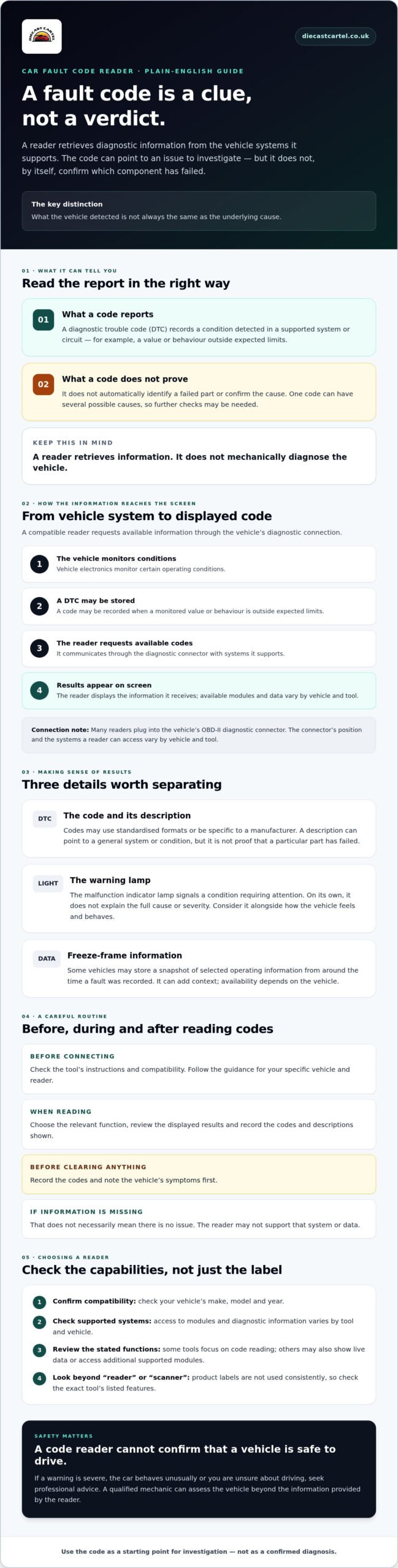
A dashboard warning appears, and you want a clearer clue before deciding what to do next. A car fault code reader retrieves diagnostic trouble codes (DTCs) from vehicle systems it supports. These codes give you information to investigate, but they aren’t a verdict on which component needs replacing.
A fault code reader retrieves stored diagnostic information; it does not mechanically diagnose or confirm the cause of a fault. A code may point to a system or circuit that needs attention, while identifying the underlying problem can require checks beyond the reader. That distinction is central to understanding what a car fault code reader can and cannot do.
What Does a Fault Code Reader Connect To?
Many readers plug into the vehicle’s OBD-II diagnostic connector. This provides a route to communicate with the engine control unit, the computer that monitors and manages engine operation, and, if supported, other electronic modules. These modules oversee different vehicle systems and may hold relevant diagnostic information.
The connector’s position and the systems a reader can access vary by vehicle and tool. Some readers retrieve basic engine-related codes, whilst others may support more modules. For background on how these systems developed and the information they can provide, see On-board diagnostics (OBD).
What Is the Difference Between a Reader and a Scanner?
Product labels aren’t used consistently, so the words “reader” and “scanner” don’t always tell you exactly what a tool can do. One device may focus on retrieving and displaying codes; another may also show live data, such as readings reported by vehicle sensors, or access additional supported modules.
Check the functions listed for the exact tool rather than relying on its name. Confirm that it supports your vehicle’s make, model and year, then check which systems it can read. A compatible reader can provide basic diagnostic information, but a longer feature list still doesn’t turn a fault code into a confirmed mechanical diagnosis.
How a Car Fault Code Reader Retrieves and Displays Diagnostic Trouble Codes
A code reaches the screen through communication between the reader and the vehicle’s supported electronics. The vehicle monitors certain operating conditions and may store a diagnostic trouble code (DTC) when it detects a value or behaviour outside expected limits. The record describes what the system detected; it doesn’t necessarily reveal why it happened.
A compatible reader uses the vehicle’s diagnostic connection to request available codes from supported systems, then displays the information it receives. The modules and data available depend on the vehicle and the reader.
From the OBD-II Connector to a Code on Screen
The process is usually straightforward, but follow the instructions for your specific vehicle and tool. Connection steps and menus can differ, so don’t assume every reader works in precisely the same way.
- Check the instructions. Confirm the reader is compatible and note any guidance about connecting it and preparing the vehicle.
- Connect the reader. Attach it to the vehicle’s diagnostic connector as directed. The reader communicates only with systems it supports.
- Select the relevant function. Choose an option such as reading diagnostic codes, following the tool’s menu prompts.
- Review and record the results. Note the code and any description shown. If information isn’t available, that doesn’t necessarily mean no issue exists. The reader may not support that system or data.
What DTCs, Warning Lights and Freeze-Frame Data Mean
DTCs are fault references that may follow standardised formats or be specific to a manufacturer. A displayed description can translate an unfamiliar code into a general system or condition, but it isn’t proof that a particular part has failed. A car fault code reader is best understood as a way to retrieve clues, not a shortcut to a confirmed diagnosis.
A malfunction indicator lamp, often called the engine warning light, signals that the vehicle has detected a condition requiring attention. The lamp and the stored code are related clues, but the warning light alone doesn’t describe the full cause or severity. Consider it alongside how the vehicle feels and behaves.
Some vehicles may store freeze-frame data, a snapshot of selected operating information from around the time a fault was recorded. It may offer context for interpreting a code, but availability depends on the vehicle and reader. Check the tool’s stated functions and your vehicle documentation, and save useful information before clearing codes or changing parts.
If you’re looking for equipment to access basic diagnostic information, explore OBD diagnostic tools and check compatibility with your vehicle and the specific tool’s instructions.
What a Car Fault Code Means, and Why It May Not Identify the Fault
A fault code doesn’t automatically mean the part named in its description has failed. It records a condition the vehicle’s monitoring system detected. Treat it as a direction for further checks, not an instruction to replace a part. The code is one piece of evidence, not a complete diagnosis. Once the exact issue is confirmed and new components are required, you can learn more about finding the right automotive spare parts to complete the repair.
For example, a misfire code may identify a cylinder where combustion isn’t happening as expected. By itself, it can’t tell you whether the cause is a component, an electrical connection or another issue. Symptoms, inspection and reliable information for the exact vehicle help narrow the possibilities.
| What the code reports | Possible causes | Evidence that can help |
|---|---|---|
| A detected condition in a system or circuit | A sensor, wiring, connector or related system issue | Vehicle symptoms, visual checks and relevant test results |
| An example: a misfire recorded for one cylinder | Several potential causes, depending on the vehicle | Vehicle-specific diagnostic references and further checks |
Can One Fault Code Have Several Possible Causes?
Yes. A code can indicate where a problem was detected without identifying its source. A sensor reading outside an expected range, for instance, could relate to the sensor itself, its wiring or connector, or another condition affecting that reading. This is an illustrative example, not a universal explanation for any particular code.
Look up the exact code using a reputable technical reference for your vehicle. Consider when the warning appeared and how the car behaved. If the cause isn’t clear, avoid replacing parts based on the code alone. Diecast Cartel’s guide, “The Top Benefits of Owning an OBD2 Scanner for UK Car Enthusiasts in 2026”, offers related context on using a scanner to access vehicle information.
Stored, Pending and Permanent Codes: What Is the Difference?
Some tools may show a code’s status as stored, pending or permanent. Broadly, these labels can indicate whether a fault has been recorded, detected without yet meeting the conditions for confirmation, or retained in the vehicle’s diagnostic system. Exact meanings, availability and wording vary between vehicles and tools, so check the manufacturer’s documentation or a reliable technical reference for your vehicle.
Status adds context, but it doesn’t prove which repair is needed. Record the code and its status alongside symptoms before clearing anything. A mechanic can use those clues, together with inspection and appropriate tests, to establish what’s actually wrong. Once a technician confirms the problem—such as when braking or vacuum issues lead you to buy brake boosters online australia—you can source the appropriate replacement component knowing you are tackling the true root cause.
How to Use a Car Fault Code Reader Safely and Make Sense of the Results
A reader can provide useful information, but it can’t decide whether your car is safe to drive in every situation. Consider the result alongside the vehicle’s behaviour and any warning signs. If you’re unsure, don’t let a code display reassure you that everything is fine.
What Should You Do Before and After Reading a Code?
Start with the vehicle handbook and the reader’s instructions. Check how the tool should be connected and used for your vehicle, then follow its prompts rather than guessing at a menu or connection step. Keep the car safely stationary while you work, and don’t use the reader in a way that distracts you from driving.
Once you’ve retrieved the available information, make a clear record before clearing codes or changing parts. Include:
- The exact code and any status shown by the tool.
- Supporting information displayed, such as freeze-frame data, if available.
- What the vehicle was doing when the warning appeared, and any symptoms you’ve noticed.
Compare these details with reliable information for the exact vehicle and code. A description on the reader can be a helpful starting point, but avoid choosing a repair based on a short label alone. If you clear a code before recording it, you may lose useful context for working out what happened.
When Should You Ask a Mechanic to Investigate?
Seek qualified help if a warning appears alongside serious or worsening symptoms, if the vehicle’s behaviour affects safe operation, or if you’re uncertain whether it’s safe to continue. If the car feels unsafe, stop somewhere safe as soon as you can and arrange appropriate assistance. Don’t rely on a basic reader to make that decision for you.
Some faults need a physical inspection, further testing or specialist equipment to identify their cause. A code may narrow the area to investigate, but it can’t guarantee a diagnosis, repair or prevention of future faults. Share your recorded results and a clear description of symptoms with the mechanic. That information can help guide the next checks.
For drivers who want access to basic diagnostic information, explore OBD diagnostic tools and check the specific tool’s instructions and compatibility before choosing. A reader can help you understand what your vehicle has reported, whilst professional assessment is the right next step when the evidence or symptoms call for it.
Choosing a Car Fault Code Reader: Compatibility, Functions and Next Steps
If you’ve searched for “car fault code reader explained”, choosing a tool is less about finding the longest feature list and more about matching its functions to your vehicle and what you want to check. A basic reader may retrieve and display codes, whilst other tools may offer live data or access to additional systems. Features are product-specific, so check the details rather than assuming every device can do the same things.
Which Compatibility Details Should You Check?
Before choosing, compare the manufacturer’s compatibility information with your vehicle’s make, model and year. Don’t rely on a general statement that a tool works with a type of vehicle. Check the exact vehicle details and confirm which systems the reader supports. Access to one system doesn’t necessarily mean it can communicate with every electronic module in the car.
Review any stated requirements for protocols, software or particular features too. These can differ between tools and vehicles, so verify them against the product specifications and your vehicle documentation. If compatibility is unclear, don’t guess. Seek confirmation before you buy.
What Features Matter for a First-Time User?
Clarity is a useful feature in its own right. Look for instructions you can follow, a display that’s easy to read and code information you can record for later reference. A clear description may help you understand the general area a code relates to, but it still isn’t a confirmed diagnosis.
Think about your intended use before focusing on extra functions. Live data may be useful if you specifically want to view information reported by the vehicle whilst it operates. Access to additional modules may matter if you need information beyond the systems covered by a basic reader. If you only want to retrieve basic codes, a feature you won’t use may not be a priority.
Before deciding, use this quick check:
- Does the tool list your vehicle’s make, model and year as compatible?
- Which systems and functions does it explicitly support?
- Are the instructions, display and code-recording options clear enough for you?
- Do you understand the limits of what the reader can tell you?
Choose for compatibility and practical use, not the label alone. If you’re ready to compare options, explore Diecast Cartel’s OBD diagnostic tools and check each tool’s stated specifications against your vehicle. A suitable reader can help you access diagnostic information; interpreting it responsibly remains part of the process.
Car Fault Code Reader Explained: Make Your Next Diagnostic Step With Confidence
A reader can make an unfamiliar warning less mysterious, but the code is a clue to investigate, not proof of a failed part. Record the result and symptoms, check information for your specific vehicle, and get qualified help if the car’s behaviour raises safety concerns.
Use the information to ask better questions, not to guess at repairs. Before choosing a tool, check that its stated compatibility and functions suit your vehicle and what you want to learn.
Diecast Cartel is an online retailer serving customers across the UK, with OBD diagnostic tools in its range for drivers seeking access to basic diagnostic information. Explore Diecast Cartel’s OBD diagnostic tools, and compare the specifications carefully before choosing. With the right expectations, a reader can be a helpful first step towards a more informed decision about what to do next.
Frequently Asked Questions
Is a car fault code reader the same as a diagnostic scanner?
Not always. The names are used inconsistently, so a product labelled a scanner may offer basic code retrieval, whilst another may display live data or access additional vehicle modules. Those extra functions aren’t guaranteed by the name. Check the specific device’s stated features and confirm compatibility with your vehicle, including its make, model and year. The tool’s actual capabilities matter more than whether it’s called a reader or scanner.
Can a fault code reader tell me exactly what is wrong with my car?
No. A code points to a condition or system the vehicle has detected, but it doesn’t always identify the root cause or the part that needs attention. Several issues can produce related codes. For instance, a code concerning a sensor reading doesn’t prove the sensor itself has failed. Symptoms, inspection and vehicle-specific testing may be needed to identify the cause and recommend a repair. That’s the key point in any car fault code reader explained guide.
Will an OBD-II reader work with every car?
No single compatibility assumption is safe. Whether an OBD-II reader works depends on the vehicle, its model year, the systems you want to check and the reader’s specifications. Even if a tool connects, it may not access every vehicle module. Consult your vehicle handbook and the tool manufacturer’s compatibility information for your exact make, model and year. Check supported systems too, rather than relying only on a general compatibility statement.
What should I do after reading a fault code?
Record the exact code, its status and any supporting details the reader displays. Note what the car was doing when the warning appeared and any symptoms you’ve noticed. Then consult reliable information for your specific vehicle and code, rather than guessing at a repair from a short screen description. A reader offers clues, not a confirmed repair plan. Seek professional assessment if symptoms are serious, worsening or raise concerns about safe operation.
Can I clear a fault code with a reader, and should I?
Some readers include a function to request code clearing, but removing a code from the display doesn’t fix the condition that caused it. Before using that function, record the code, status and any available supporting information, then follow the vehicle and tool instructions. If the underlying issue remains, the code or warning may return. If you don’t know why the code appeared or whether clearing it is appropriate, ask a qualified mechanic for advice.
Does a fault code reader turn off the engine warning light?
Some readers can request that diagnostic codes be cleared, but this doesn’t necessarily resolve the condition that triggered the engine warning light. The light may stay on or return, depending on the fault and vehicle. Focus on understanding the reported code and investigating its cause, rather than treating the light itself as the problem. Record the available information first, and follow the vehicle handbook and reader instructions before attempting to clear anything.
When should I stop driving and contact a mechanic after a fault code appears?
A code alone can’t give a reliable, universal judgement about whether your car is safe to drive. Check the vehicle handbook for guidance on the warning, and pay attention to how the car behaves. If it feels unusual, a warning calls for urgent action or you’re unsure, stop somewhere safe and seek qualified help. Don’t rely on a reader’s result to overrule serious symptoms or the vehicle’s specific instructions.
