
Diecast Guides
Does My Car Have an OBD2 Port? How to Find It in 2026
Oct
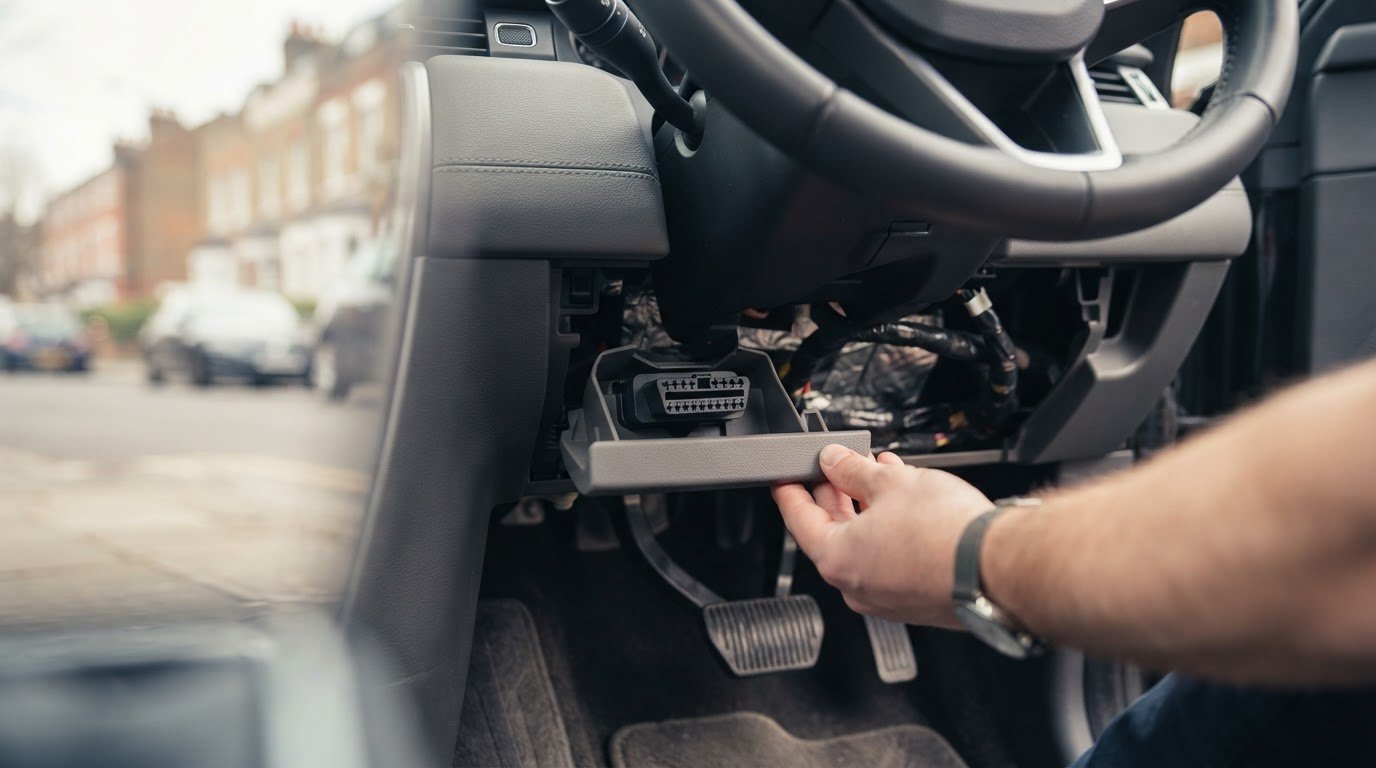
What if the socket is there, but hiding just out of sight beneath the dashboard? If you’re asking, “does my car have an OBD2 port?”, you’re not alone. The connector can be tucked above the pedals or behind a small cover, and terms such as OBD2, OBD-II and EOBD can make it harder to know what to look for.
You can usually find the port without taking apart the dashboard. A standard OBD2 connector has a distinctive 16-pin, trapezoid-like shape and is often beneath the driver’s side of the dash. But spotting the socket is only the first step: it doesn’t automatically mean every diagnostic reader will work with your car or access every system.
This guide explains where to look, how to recognise the connector and what to check before plugging in a reader. It also clarifies how the diagnostic terms relate, so you can check compatibility and decide what to do next with a suitable OBD2 tool.
Key Takeaways
- Wondering “does my car have an OBD2 port”? Start beneath the driver’s-side dashboard, around the steering column.
- Look for a 16-pin, trapezoidal socket, which may be set into a recess or tucked behind a cover.
- Finding a socket doesn’t guarantee that every reader can connect or access the same vehicle data. Compatibility depends on the car and the tool.
- Before connecting a reader, switch off the ignition and check the port for visible damage, debris or corrosion. Don’t probe the pins.
- Choose a suitable reader and follow its instructions. A fault code points to a reported issue, but doesn’t confirm its underlying cause.
Does my car have an OBD2 port? Start with the usual location
Many cars have a standard diagnostic connector, but its position varies. If you’re wondering, “does my car have an OBD2 port?”, start inside the cabin rather than under the bonnet. The socket may be easy to spot or partly tucked behind a small flap in the lower dashboard.
The usual place to find an OBD2 port is beneath the dashboard on the driver’s side, near the steering column. Sit in the driver’s seat and look below the steering wheel, including above and beside the pedals. A torch can help you see into shadowed recesses without removing anything.
Move your view gradually across the lower dashboard. Look for an open-facing socket or a small access flap, and check the visible edges of nearby trim. Don’t assume a blank panel is removable, and don’t pull at dashboard pieces to search behind them. The aim is to find an accessible connector, not dismantle the cabin.
- Check directly beneath the steering wheel and around the steering column.
- Look above the pedals and along the lower edge of the dashboard.
- Use a torch to inspect dark recesses and the edges of visible access covers.
- Leave trim and connectors in place if they don’t move easily.
The socket is part of the vehicle’s onboard diagnostic system, which helps monitor and report information about the car. The overview of On-board diagnostics (OBD) explains how OBD versions and the diagnostic connector developed. For your search, focus on the socket itself: a small, open-facing connector rather than a control or ordinary power outlet.
Where should I look first for an OBD2 port?
Start on the driver’s side. With the car safely parked, use a torch to inspect beneath the steering wheel, around the steering column and along the lower dashboard. Look for a small access cover, but only open one that’s clearly designed to give access. If you can’t see a socket straight away, change your viewing angle before touching the trim.
What if the socket is not under the steering wheel?
Its position can vary by make, model and year, so widen your search rather than forcing a panel. Check the centre-console area, the lower dashboard on both sides and the space near the gear selector or glovebox. These are places to inspect, not guaranteed locations. Use a torch and look for a visible access flap; don’t pry at covers or reach behind fixed trim.
The vehicle handbook may identify the diagnostic connector’s location for your particular car. Search its index for “OBD”, “diagnostic connector” or “diagnostic socket”. This vehicle-specific guidance can save time, especially when the port is concealed from a normal seated view. If the handbook points to an area you’ve already checked, inspect it again from a different angle before concluding that the socket isn’t there.
How to recognise an OBD2 connector once you find it
A standard OBD-II diagnostic connector has a distinctive shape: a small, trapezoidal socket with 16 pin positions arranged in two rows. It’s generally open-facing, so you can see it without removing anything. Depending on the car, it may sit in a dashboard recess or behind a small access cover.
Use the outline and two-row pin layout as visual clues. A torch can help if the socket is set back in a dark space. Compare what you can see with the connector description in your vehicle handbook, and don’t insert a key, screwdriver or other object to check the pins. The SAE J1962 standard for OBD-II connectors describes the standardised connector. Visual similarity alone, however, can’t confirm how a particular vehicle communicates or what a reader can access.
What does a standard 16-pin OBD2 socket look like?
Look for a trapezoid-like opening with two rows of pin positions, eight in each row. The socket may be mounted with the wider edge at the top or bottom, so focus on its overall outline and layout rather than its orientation. Don’t touch or probe the contacts. If the shape is unclear, or the handbook shows a different arrangement, pause and check the vehicle-specific guidance.
You may also see a label such as OBD, OBD-II or EOBD nearby. These names relate to onboard diagnostic systems, but they don’t guarantee that every car supports the same functions. A car may offer access to emissions-related data without giving a reader access to every control unit or system. Nor does a trapezoidal socket automatically prove that it’s a standard OBD2 port: a similar-looking connector can be misleading. Treat the shape as a first clue, then use the vehicle handbook and reader compatibility information to confirm.
Is OBD2 the same as EOBD in the UK?
EOBD refers to the European implementation related to OBD-II emissions diagnostics. The terms are often used in connection with one another, but don’t assume they mean identical diagnostic coverage on every vehicle. Check the handbook and the reader’s compatibility information for your particular car.
Vehicle-year rules and diagnostic requirements can depend on the vehicle and market, so avoid relying on a simple age-based assumption. If you’re still asking, “does my car have an OBD2 port?”, separate the visual check from the compatibility check: identify the connector first, then confirm what the car and reader support. When you’re ready to explore a suitable OBD diagnostic tool, use your vehicle details and the stated compatibility guidance to narrow down your options.
Does finding an OBD2 port mean your car is compatible?
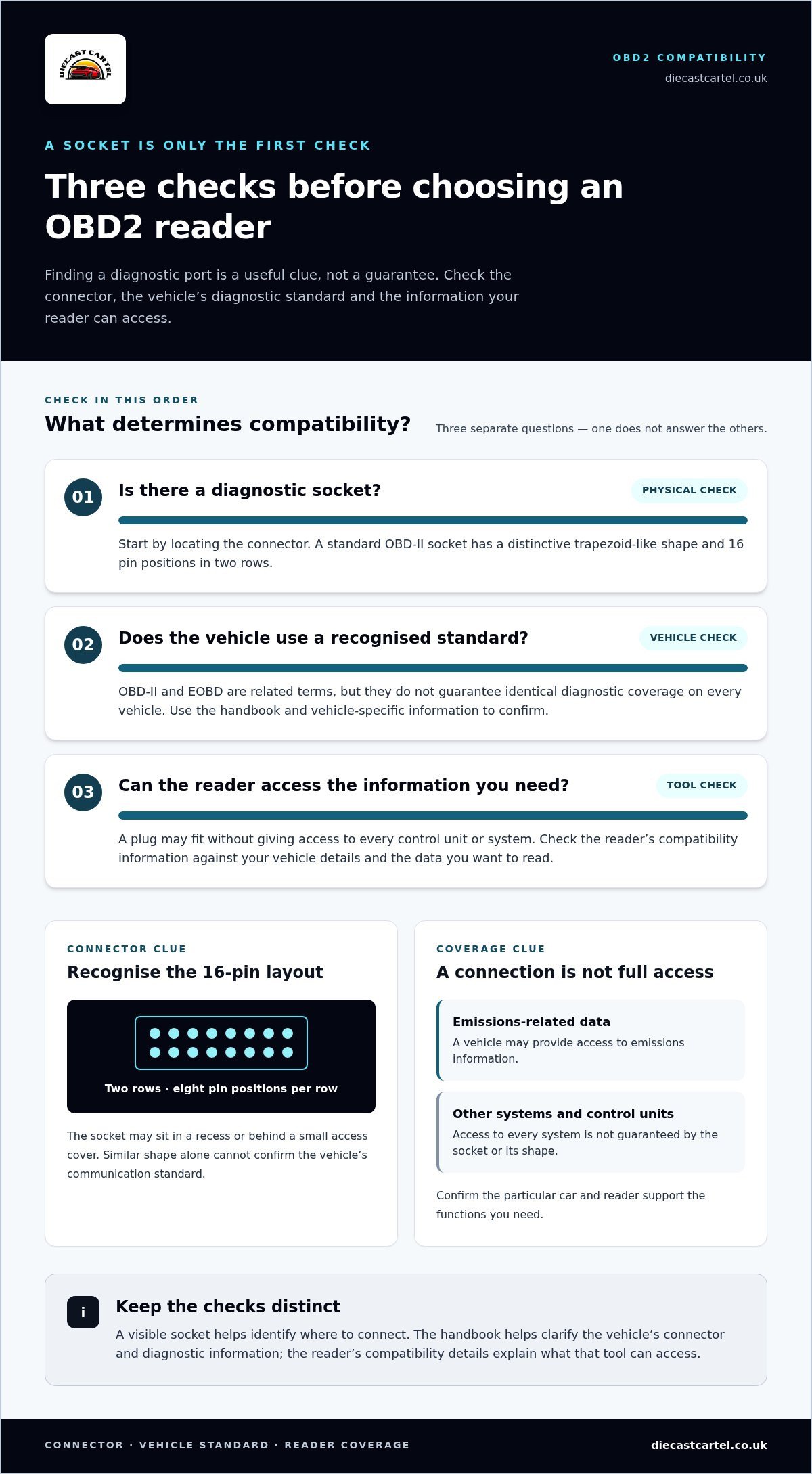
Finding a diagnostic socket is a useful clue, but it doesn’t settle compatibility on its own. Check three things: whether there’s a socket, whether the vehicle uses a recognised diagnostic standard, and whether your chosen reader can access the information you need. A plug may fit even when the reader supports only some of the car’s systems.
Compatibility and diagnostic coverage can depend on the vehicle’s age, the market it was built for and the manufacturer. So if you’re asking, “does my car have an OBD2 port?”, remember that spotting a connector answers only the first part. Next, check your vehicle details against the reader’s stated support.
| Check | What it tells you |
|---|---|
| Port present | A connector is fitted in the car; its appearance alone doesn’t prove compatibility. |
| Standard compatibility | The car and reader can communicate using a diagnostic standard they both support. |
| Reader-supported functions | The systems and data the reader can actually access on that vehicle. |
How does vehicle age affect OBD2 compatibility?
As a broad UK rule of thumb, petrol cars registered from 2001 and diesel cars registered from 2004 are generally described as EOBD-compliant. Treat those dates as an initial guide, not a guarantee for an individual vehicle or proof that every diagnostic function is available. Older cars and imports can need closer, model-specific checking.
Before choosing a reader, use the registration details, make, model and engine information to check compatibility against the vehicle handbook and the reader’s coverage information. Registration-year guidance is useful, but it shouldn’t replace checking the exact vehicle. Requirements and coverage may differ by market, so don’t apply a date from another country as though it automatically covers a UK-registered car.
Can every OBD2 reader access the same information?
No. A reader may retrieve standard emissions-related diagnostic codes, while access to manufacturer-specific systems or extra functions can vary. Depending on the tool and vehicle, those additional functions may include information beyond basic engine fault codes. A matching plug confirms physical fit, not full access. Check that the reader supports both your vehicle and the functions you want before connecting it.
It also helps to distinguish a reported code from a complete diagnosis. A code points to an issue reported by a vehicle system; it doesn’t necessarily identify the failed part or explain the underlying cause. For broader context on what diagnostic tools can help you learn about your car, explore the benefits of owning an OBD2 scanner.
Keep the three checks in order: confirm there’s a socket, establish that the car and reader share a compatible standard, then check which functions the reader supports. This helps prevent a familiar-looking connector from creating false confidence.
How to inspect your car’s OBD2 port before connecting a reader
Before plugging anything in, take a moment to check the socket. If you’ve been wondering, “does my car have an OBD2 port?”, finding a connector is only the start. A quick visual inspection can help you spot obvious damage or debris, but it can’t confirm that the wiring is sound or diagnose a fault.
Park somewhere safe, make sure the car is stationary and switch off the ignition. Use a torch to look into the socket without touching its pins. Check for:
- Bent or misaligned pins that don’t appear to sit evenly.
- Debris inside the opening, such as dust or small objects.
- Corrosion, discolouration or other visible signs of deterioration.
- Obvious physical damage to the socket, its surround or nearby trim.
Don’t probe the connector or try to straighten a pin yourself. Avoid using tools or liquids to clear the socket. If you see debris or damage that could interfere with the connection, stop rather than risk pushing it further inside.
What should you check before plugging anything in?
Only proceed if the connector is visible and appears clean and undamaged. Compare the reader’s plug with the socket, and align their shapes and orientation before bringing them together. It should fit without force. Follow the reader’s instructions and your vehicle handbook for the correct ignition position and connection order, as these can vary by device and car.
If the plug resists, stop. Don’t twist or push harder to make it fit. Check the alignment and compatibility information instead. A connector that looks similar may not be the right match for the reader, and forcing the plug could damage the socket or reader.
What if the port is covered, damaged or inaccessible?
Use the vehicle handbook to locate the socket and identify any intended access cover. If reaching it would mean removing dashboard trim, pulling at a panel that won’t open easily or handling exposed wiring, leave it alone. If damage is visible or the reader meets unusual resistance, arrange a professional inspection rather than attempting a repair.
A visual check has limits. A socket can look fine while still having an electrical or wiring issue, and visible damage alone doesn’t reveal the cause or confirm whether the vehicle has a fault. Don’t treat appearance as a diagnosis. Stop if you’re uncertain, particularly if the connector seems loose, sits at an unusual angle or has wiring exposed around it.
Once the port looks accessible and undamaged, use a compatible reader and follow its instructions carefully. To take that next step, explore OBD diagnostic tools and check the stated vehicle compatibility before choosing one.
Found the OBD2 port? Choose a suitable next diagnostic step
Once you’ve located the socket, take the next steps in order: confirm that a reader supports your vehicle, choose one with the functions you need, then follow its instructions for connection and use. A plug that fits isn’t enough on its own. Compatibility information should match your car’s make, model and year, and the reader’s guidance should explain how to use it safely.
What can you do after connecting a compatible reader?
A compatible reader may retrieve diagnostic trouble codes (DTCs), and some devices can also display live data. The exact information depends on both the vehicle and the reader. A code description can point you towards a system or condition to investigate, but it’s a starting clue, not proof that a particular component has failed.
Before clearing anything, write down or save every code, along with any displayed description and relevant symptoms. Clearing codes can remove useful information from the reader’s view, making it harder to understand what was reported. Don’t clear a code simply to switch off a warning light. First consider what the vehicle is reporting and whether the warning or the way the car is behaving calls for prompt attention.
Use a short checklist:
- Confirm compatibility: check that the reader supports your specific vehicle.
- Follow the instructions: use the connection order and ignition position specified for the reader and car.
- Record the results: note codes and relevant live data before clearing or changing anything.
- Interpret carefully: treat code descriptions as guidance, not a complete diagnosis.
When should you stop and seek further help?
Stop if the reader won’t fit without force, won’t connect as instructed or fails to communicate normally. Don’t keep reseating it or try to alter the socket. If the car displays a safety-critical warning, has a serious drivability problem or behaves unpredictably, don’t treat a code reader as a reason to continue driving; seek prompt professional advice.
A warning light deserves attention even if the car seems to drive normally. A reader can help you understand what a system has reported, but it can’t establish the cause from a code alone. Keep your notes, follow the vehicle’s warning guidance and avoid replacing parts based only on a code description.
Finding the port is a useful first step, not a repair. With compatibility checked and results recorded, you’ll be better placed to decide what to do next. When you’re ready to begin exploring car diagnostics, take a look at the OBD diagnostic tools available from Diecast Cartel.
Make your next check a confident one
Knowing where the port is gives you a useful first step towards understanding your car’s diagnostic information. If the question “does my car have an OBD2 port” brought you here, you can now move from searching to making a considered choice: match a reader to your vehicle and the information you want to access.
Keep a simple record of warning lights, symptoms and any codes you read. That context can make future checks more useful, especially if an issue returns or changes over time. A diagnostic reader can inform your next decision, but it doesn’t replace careful judgement when the car isn’t behaving as it should.
When you’re ready to take that step, explore OBD diagnostic tools at Diecast Cartel’s online shop, serving drivers across the UK. Choose with your vehicle’s compatibility in mind and approach your next diagnostic check with a clearer plan.
Frequently Asked Questions
Does every car have an OBD2 port?
No, you shouldn’t assume every car has a standard OBD2 port. Vehicle age, the market it was built for and its diagnostic system all matter. In the UK, petrol cars registered from 2001 and diesels from 2004 are generally EOBD-compliant, but those dates are a guide, not a guarantee for a particular vehicle. Older cars and imports may use different arrangements, so check the handbook or vehicle-specific compatibility information.
Where is the OBD2 port usually located?
It’s commonly inside the cabin, beneath the driver’s-side dashboard around the steering column. If it’s not immediately visible, check the lower dashboard and centre-console area, including near the gear selector or glovebox. Some cars have a small access flap, while others place the socket further back in a recess. Use a torch and consult the handbook’s index or cabin diagram before moving any trim.
What does an OBD2 port look like?
A standard OBD-II socket has a trapezoidal outline and 16 pin positions in two rows. It may be set into the dashboard or sit behind a cover, and its orientation can differ. Look at the shape and layout without inserting anything into the openings. A similar-looking connector isn’t proof of compatibility, so compare it with the handbook and check that a reader supports your specific vehicle before use.
Are OBD2 and EOBD the same thing?
They’re related terms, but they don’t always mean identical coverage. OBD-II is the diagnostic standard associated with the familiar connector, while EOBD refers to its European implementation for emissions-related diagnostics. The systems may share standardised functions, but access to other vehicle systems can vary by car and reader. Check the reader’s stated coverage for your make, model and year rather than relying on the label alone.
Can I use an OBD2 scanner on an older car?
Possibly, but an older car may pre-date standardised OBD2 or EOBD diagnostics, and its socket or communication system may differ. Even if a connector is present, a modern scanner might not communicate with it. Check the handbook and the scanner’s compatibility information using the car’s make, model, year and engine details. For an import, use information that matches its original market as well as its current registration.
Can I damage my car by plugging in an OBD2 reader?
A correctly matched reader used as instructed should connect without force, but damage is possible if you push in the wrong plug, force a poor fit or connect to a damaged socket. Check the plug’s orientation first, and stop if it resists or the pins look bent. Follow the reader and vehicle instructions for ignition position and connection order. Never probe the socket with tools or try to adjust its pins.
What should I do if I cannot find my car’s OBD2 port?
Check the vehicle handbook for a diagnostic-socket location diagram or search its index for “OBD” or “diagnostic connector”. Use a torch to inspect the lower dashboard and any clearly marked access flap, but don’t dismantle trim or reach behind exposed wiring. If the handbook doesn’t resolve the search, or access appears damaged or obstructed, stop rather than forcing a panel. A qualified technician can inspect the vehicle safely.
