
Diecast Guides
Diecast Car Photography Tips: How to Make Your Models Look Real

Oct
Your next great diecast car photo may need less equipment, not more. A phone and a carefully positioned model can capture plenty of character, but soft details, bright reflections and backgrounds that look unmistakably miniature can get in the way. These are familiar frustrations for collectors. The right diecast car photography tips can help you show off the paintwork and fine details with the kit you already own.
Realistic miniature photography comes down to controlling light, scale cues and camera distance. You don’t need a professional studio: soft window light, a steady camera and a considered viewpoint can make a real difference. Lowering the camera to the car’s level helps it feel more life-sized, while a simple background keeps attention on the model.
In this guide, you’ll learn how to soften glare on glossy paint and windows, frame your car to show off its shape, and keep small details sharp. You’ll also find easy background ideas and practical camera-setting advice to help you create believable scenes and photographs you’ll be proud to share with fellow collectors.
Key Takeaways
- Prepare the model and clear distracting objects from the scene before you shoot.
- Use diffused light to reveal glossy paintwork while keeping reflections under control.
- Apply these diecast car photography tips to balance focus, exposure and depth of field with the camera you already own.
- Build a sense of scale by layering the foreground, model and background without overcrowding the frame.
- Review each image with a simple edit: crop it, adjust exposure and check that the model’s colours still look true.
Diecast car photography starts with a simple, well-prepared scene
A finely detailed model can look flat or toy-like in an ordinary snapshot, even when it’s a favourite in your collection. The fix usually isn’t a more expensive camera. A clean model, an uncluttered setting and light you can control give the details room to show. Start with the scene, so you can concentrate on the car rather than distractions in the frame.
Clear the surface, remove objects that don’t belong and decide what you want the photograph to say. A plain background lets the car’s shape and paintwork take the lead. Add props only when they support its story, not simply to fill empty space.
How to prepare a diecast car before photographing it
Choose a tidy spot with enough room to handle the model safely and position your camera. Remove visible dust with a soft, clean brush, working gently around delicate details. Avoid pressing on mirrors, aerials or other small parts, which can be easy to catch while cleaning or moving the car.
Check your lens for smudges, then take a quick test frame. Dust or fingerprints that aren’t obvious to the eye may stand out in a close-up. The test shot can reveal these distractions before you arrange the final scene. Make any adjustments carefully.
Which background makes a scale model look more realistic?
Start with a neutral, matte surface. It won’t compete with the car’s colour or reflect as much light as a glossy background. A simple road-like surface can suit a car, while a setting that suggests the model’s intended environment can add context without requiring elaborate scenery.
Keep background objects unobtrusive and believable in size. Oversized stones, coarse textures or familiar household items can reveal the miniature scale at once. Position the model so the background supports its story, and leave clear space around it to keep attention on the vehicle. These relative size cues are part of forced perspective, where viewpoint and the visual relationship between objects can help a miniature seem more life-sized.
Before adding another prop, ask whether it strengthens the scene. A restrained setup often feels more convincing than a crowded one, and it’s easier to adjust if the test frame doesn’t look right. Once the model, surface and background work together, you have a dependable starting point for controlling the light.
Use soft lighting to reveal diecast paintwork without harsh glare
Glossy paint and clear windows act like tiny mirrors. They reflect nearby objects, from a bright window to a lamp or pale clothing. A sharp white patch can hide the bonnet’s colour or obscure the cabin, and on a small model a reflection can quickly take over the frame.
Diffused light is spread across a larger, softer source, creating gentler highlights and less distracting reflections on a miniature. Start with indirect daylight from a window, or soften a lamp with an appropriate diffuser. Avoid strong direct sun, which can create hard highlights and deep shadows across the bodywork.
How to reduce reflections on diecast cars
Position the car and camera so the brightest reflections fall away from the details you want to show. If a window appears as a sharp shape on the door or windscreen, change the light’s angle or distance first, then check the result. Moving the model can change both the composition and reflections, so adjust the light before shifting the car.
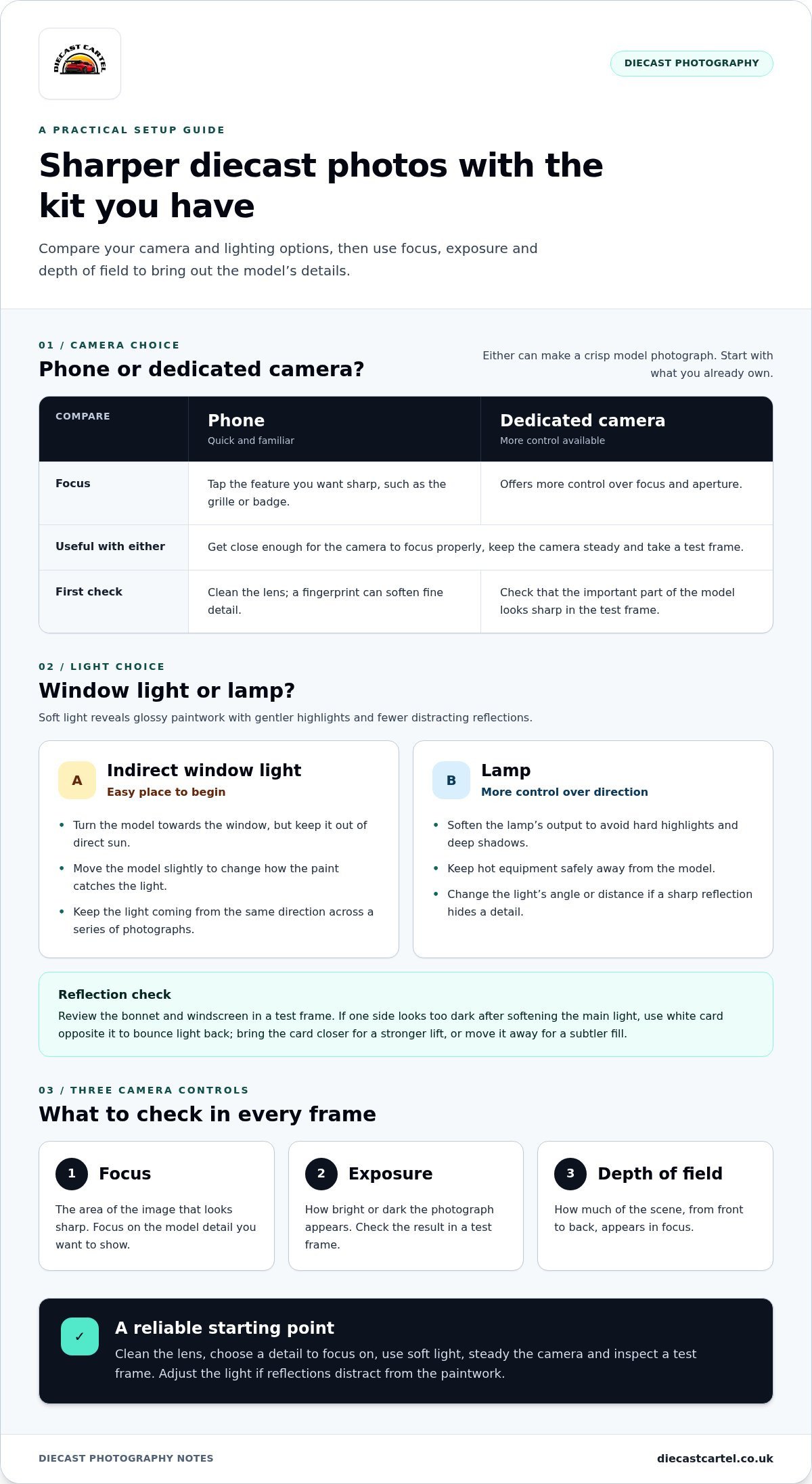
Check the bonnet and windscreen in a test frame. A reflection that seems small in person may dominate on a phone screen. If one side of the car looks too dark after you soften the main light, hold a piece of white card opposite it to bounce light back. Bring the card closer for a stronger lift, or move it away for a subtler fill.
Natural light or a lamp: what should beginners use?
Indirect window light is an easy place to begin. Turn the model towards the window but keep it out of direct sun. Moving it slightly can change how the paint catches the light. A lamp offers more control over direction, but soften its output and keep hot equipment safely away from the model.
For a series of photographs, keep the light coming from the same direction. Consistency helps different angles feel like one set rather than shots taken under changing conditions. For more ideas on lighting and setting up a small shoot, explore these miniature photography tips.
Try these diecast car photography tips with a phone: take a frame, note where the brightest reflection falls, then move the light and compare. Once you find a look that shows the paint clearly, use it for the cars, trucks and tractors in your collection. You can also browse diecast model cars for another subject to photograph.
Choose camera settings that keep your diecast car sharp
You can take a crisp model photograph with a phone or a dedicated camera. A phone is quick and familiar, while a camera may offer more control over focus and aperture. Either way, the biggest improvements often come from getting close enough to focus properly and keeping the camera steady, not from buying new kit or copying a particular setting.
Three terms make the controls easier to understand. Focus is the area of the image that looks sharp. Exposure is how bright or dark the photograph appears. Depth of field is how much of the scene, from front to back, appears in focus. Get these working together and the car’s details have a better chance of standing out.
Can you photograph diecast cars with a phone?
Yes. Start with the standard camera app and clean the lens, as a fingerprint can soften fine detail. Tap the most important feature, such as the grille or badge, to set focus. Take a test frame and inspect it at full size. If the detail still looks soft, steady the phone and try again before changing modes.
Avoid digital zoom if it noticeably reduces detail. Move the phone closer instead, while staying far enough away for it to focus. Portrait mode can blur the background, but check the car’s edges afterwards. Software blur may soften mirrors, aerials or other fine parts too.
How to focus and expose a close-up model photo
With a camera, choose a smaller aperture, shown by a higher f-number, when you want more of the model to appear sharp from front to back. A smaller aperture lets in less light, so you may need a slower shutter speed. Use a tripod or another stable support if the camera needs longer to take the photograph, helping prevent camera shake.
Check the result before moving on. If the image is too dark, adjust exposure carefully and check bright paint, chrome and windows for detail lost in white highlights. A phone may make these adjustments automatically, but tapping to focus and reviewing the preview still helps you catch missed details.
A shallow depth of field can make one detail look crisp while leaving other parts of the model, such as the nose or rear, noticeably soft. That can suit a close-up, but it may frustrate you if you want the whole car sharp. Treat these tips as a starting point, not fixed rules: take a frame, inspect what’s in focus, then make one small change at a time.
Compose diecast car photos that feel life-sized
Camera height can change the whole story of a miniature. From above, you see the roof and layout clearly, but the elevated viewpoint can make the vehicle look like a toy on a surface. Lower the camera to the model’s level and the scene feels closer to a real road view. The car takes up more of the frame, and the background appears further away.
Which angles work best for diecast car photography?
Try a low, model-level shot first, then turn the car slightly for a three-quarter view. This angle shows the front and side together, giving a strong sense of the vehicle’s shape. Keep the camera level with the car. Tilting sharply up or down can distort its proportions and make the body look unusually long or short.
An overhead view has its place. Use it when the roof, the arrangement of several models or the surrounding scene is the main subject. Comparing a low frame with an overhead one helps you find which view best suits the details you want to feature.
How to create believable scale and depth
Think in three layers: foreground, subject and background. A small area of road-like surface in front of the car can lead the eye towards it, while a simple background adds context. Leave breathing room around the model, and check the frame edges for distracting joins, household objects or oversized details that give away the miniature scale.
Keep the visual story consistent. A road surface, for example, will feel less convincing beside props that suggest a very different setting or scale. Choose only a few supporting details, and make sure they help the viewer imagine where the car belongs rather than compete for attention.
Framing determines what the viewer notices. A close crop can draw attention to a wheel, badge or grille, while a wider frame establishes the setting around the vehicle. Try both, but keep important details within the composition. If the background is distant, let it soften slightly while the car remains clear. Avoid blurring so much that mirrors, aerials or body edges lose definition.
These photography techniques work just as well for trucks and tractors: lower the viewpoint, simplify the frame and build depth with restraint. Looking for another model to photograph? Explore diecast cars, trucks and tractors and choose a subject that inspires your next composition.
Edit and review your diecast car photos with a repeatable workflow
A quick, consistent edit can bring out the character you noticed in the model without making the photograph feel artificial. Start by choosing the sharpest frame, then crop it, correct the exposure and check the colour. Making these adjustments in order helps you see what each one changes, rather than piling on effects to compensate for an earlier edit.
Which edits improve a miniature photo without overdoing it?
Make small adjustments to brightness and contrast first. Then check the white balance, which controls whether the image looks too warm or too cool. Compare the paint with the physical model as you edit. A vivid red can quickly look unrealistic if saturation is pushed too far, and excessive contrast can hide subtle curves or surface texture.
Crop away distracting edges or empty space, but keep the whole vehicle comfortably within the frame unless you’re deliberately creating a detail shot. Avoid heavy sharpening, which can add harsh outlines around windows, badges and body panels. Strong background effects can also make the car look pasted into the scene rather than part of it.
A simple checklist before sharing your model photos
Before you save or share the finished image, pause and review it at full size. Zooming in can reveal small problems that are easy to miss in a thumbnail, including soft focus, leftover dust or editing artefacts. Then look at the entire frame to check that the composition still feels balanced.
- Is the important part of the model in focus?
- Do reflections hide any paintwork or details?
- Are there distracting edges or objects near the frame?
- Does the background support the model’s story?
- Do the edited colours still resemble the model in front of you?
If an edit makes the paint look unnatural or the model’s shape seem distorted, reduce or undo it. The aim is to present the details faithfully, not to transform the car into something it isn’t.
A repeatable approach makes it easier to photograph different models in a consistent style as your collection grows. These diecast car photography tips can help you build a set of images that reflects the care you put into collecting. Browse the diecast model cars, trucks and tractors for inspiration for your next shot.
Put these photography ideas into practice
Start with a clean model and a simple scene, then use soft light to reveal the paintwork without letting reflections take over. Keep your camera steady, focus on the details that matter and choose a low viewpoint when you want the model to feel more life-sized. A light, natural edit can polish the final image while preserving the character of the car.
The most useful diecast car photography tips are the ones you try with your own collection. Take a few frames, compare the results and make one small adjustment at a time. Each session is a chance to notice new details and develop a style that feels like yours.
Looking for a fresh subject to photograph? Diecast Cartel’s online range features 1:18 and 1:24 scale model cars, trucks and tractors for collectors and hobby enthusiasts. Browse diecast model cars and discover your next photography subject, then enjoy bringing it to life through the lens.
Frequently Asked Questions
How do you take good photos of diecast cars?
Prepare the model and scene, then take a few test frames before settling on your composition. A clean lens, tidy background and controlled light help show the car’s details without distractions. Try a low viewpoint for a more realistic feel, and keep the camera steady to avoid blur. These tips work with a phone or camera, so begin with the equipment you have.
How do you stop reflections when photographing model cars?
Move the light source before repositioning the model. Glossy paint, chrome and windows reflect bright objects nearby, so shift the light’s angle or distance and check the bonnet and windscreen in a test frame. Indirect window light or a softened lamp can make reflections less harsh. If one side looks too dark, use white card opposite the light to gently brighten the shadow without adding another hard reflection.
What is the best lighting for diecast car photography?
Soft, diffused light is a reliable starting point because it produces gentler highlights on small glossy surfaces. Try indirect daylight near a window, keeping the model out of strong direct sun. A lamp can also work if its light is softened and positioned safely away from the model. Keep the light coming from a consistent direction when photographing several angles, so the images feel like a cohesive set.
What camera settings should I use for miniature photography?
Prioritise focus and camera stability over copying a fixed set of settings. With a camera, try a smaller aperture, shown by a higher f-number, to keep more of the model sharp from front to back. Keep ISO low, around 100 to 400 as a starting range, to limit image noise. A smaller aperture may require a slower shutter speed, so use a tripod or stable support to help prevent blur.
How do you make a diecast car look life-sized in a photo?
Place the camera close to the model’s height rather than shooting straight down. A low viewpoint makes the car feel more present, while a three-quarter angle reveals its front and side. Keep the scene believable with background details that suit the setting and don’t look oversized beside the vehicle. A foreground, car and background can add depth, but leave out props that distract or give away the miniature scale.
Should I edit diecast car photos before sharing them?
Light editing can improve a photo, but keep adjustments subtle. Select the sharpest frame, crop away distractions, then correct brightness and white balance so the paint still looks true to the physical model. Check the image at full size for dust, blur or editing artefacts. Avoid excessive saturation, sharpening and artificial background effects. Preserving the model’s colour, texture and proportions keeps the finished photograph convincing.
